
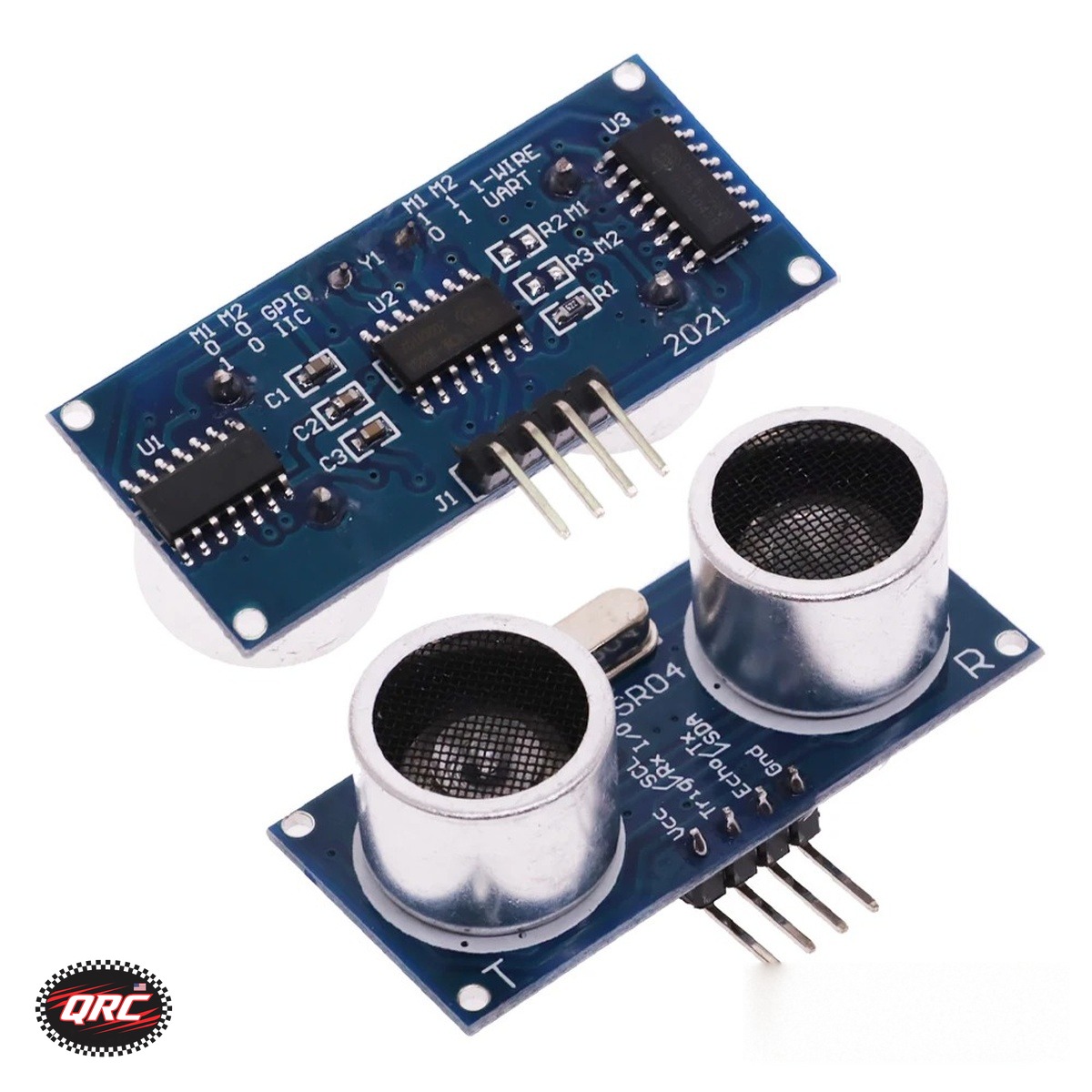
Build the meter from an HC-SR04 ultrasonic sensor, a 0.96 inch OLED display, and a Nano V3.0 board. The sensor measures 2 cm to 450 cm with 0.3 cm precision. The display shows the reading on 128 by 64 pixels over I2C. The sensor module alone costs $4.49, and the display costs $7.49.
Quick facts
| Fact | Value |
|---|---|
| HC-SR04 range | 2 cm to 450 cm, 0.3 cm precision |
| HC-SR04 blind spot | 2 cm |
| HC-SR04 supply | DC 5V, under 2 mA static current |
| HC-SR04 signal | 40 kHz pulses, sensor angle under 15 degrees |
| OLED display | 0.96 inch, SSD1306, 128 by 64, I2C |
| Nano board | ATmega328P, 16 MHz, 32KB flash, USB-C |
How does the HC-SR04 measure distance?
The module sends a series of 40 kHz ultrasonic pulses and times the echo from an object. Pull the TRIG pin low, then give a pulse signal of more than 10 microseconds, and the module replies on the ECHO pin. The TRIG pin is pulled internally with a 10K resistor. The module combines the transmitter, receiver, and control circuit in one board with four pins: VCC, TRIG, ECHO, and GND.
Which HC-SR04 option do you need?
Pick the module alone at $4.49 when you will mount the sensor yourself. Pick the sensor with a transparent or blue bracket at $5.63 or $5.60 when you want the acrylic mounting bracket and screws included. The bracket alone costs from $4.01, without a sensor. The module only option is the sensor board alone, so check the configuration before you order.
How does the OLED show the reading?
The 0.96 inch OLED shows the distance on 128 by 64 pixels over I2C, using 4 pins: GND, VCC, SCL, and SDA. It runs on 3.3V to 5V, and the I2C address is selectable as 0x3C or 0x3D on the back of the board. Pin headers come soldered on. Drive it with the Adafruit SSD1306 or U8g2 library, and pick the yellow-blue, white, or blue display version.
What does the Nano board add?
The Nano V3.0 board runs the meter sketch on an ATmega328P at 16 MHz, with 32KB of flash and 2KB of RAM. It uses a CH340G USB chip and a USB-C port, and it works with the Arduino IDE on Windows, Mac, and Linux. Install the CH340G driver first, then the board shows up in the IDE. No cable is included, and the pin headers are included but unsoldered.
How do you build the distance meter?
- Pick the HC-SR04 module alone, or a sensor plus bracket option.
- Wire VCC and GND to 5V power, TRIG to a digital output, and ECHO to a digital input.
- Wire the OLED GND, VCC, SCL, and SDA pins to the board I2C pins.
- Load a sketch that sends a TRIG pulse over 10 microseconds and times the echo.
- Show the distance in centimeters on the OLED display.
- Test at a known distance, then check readings from 10 cm out to 450 cm.
Parts that fit this guide
In-stock parts ship from the New York, USA warehouse. Prices below are the live store prices verified on November 12, 2026. Check the product page for the current price before you order.
HC-SR04 Ultrasonic Ranging Sensor Module ($4.49 module only)
HC-SR04 module at $4.49 for the module alone. It measures 2 cm to 450 cm with 0.3 cm precision, with bracket options available.
0.96 Inch OLED Display Module, SSD1306, I2C, 128×64 ($7.49)
OLED display at $7.49. It has 128 by 64 pixels, an I2C interface, and a selectable 0x3C or 0x3D address.
Nano V3.0 Development Board, ATmega328P, CH340G, USB-C ($8.49)
Nano V3.0 board at $8.49. It runs at 16 MHz with 32KB of flash, and works with the Arduino IDE.
Shop the full range: Sensor Modules and Displays at Quality RC Parts. See also: How to Choose the Right Sensor for Arduino Projects.
Frequently asked questions
How close can the HC-SR04 measure?
Down to 2 cm. The blind spot is 2 cm, so objects closer than that do not read reliably.
Does the $4.49 option include a bracket?
No. The $4.49 option is the module alone. The sensor plus bracket options cost $5.60 or $5.63.
Which I2C address does the OLED use?
The address is selectable as 0x3C or 0x3D on the back of the board. Set your sketch to match the board setting.
Can the meter run on a battery?
The sensor needs DC 5V, and the display runs on 3.3V to 5V. Use a 5V supply that covers the sensor, the display, and the board.
Sources
- Adafruit monochrome OLED breakouts wiring guide
- How to Choose the Right Sensor for Arduino Projects
- How to Build a Wildlife Camera with an ESP32-S3-CAM
Last updated: November 12, 2026.
Shipped fast and securely from our secure facility in New York, providing fast, high quality USA shipping.