
VL6180X and VL53L5CX Time-of-Flight Sensors with Arduino
Two new time-of-flight sensors cover the two ends of short-range sensing. The VL6180X reads objects from 5 to 100 mm away, which is the range for a hand over a sensor, a lid closing, or a liquid level check. The VL53L5CX splits its 61-degree field of view into an 8 by 8 grid of 64 zones and reports a distance for each one, out to 4 meters, which is the range for a robot that needs to know where obstacles are, not just how far the nearest one is. This guide wires both to an Arduino and reads both in code.
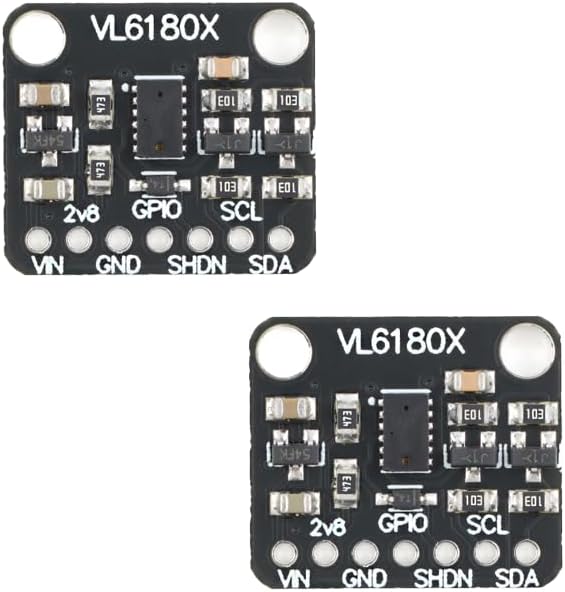
The close-range board is the VL6180X Time-of-Flight Distance Sensor Breakout 5-100mm I2C for Arduino ($5.99). It measures distance from 5 to 100 mm with a laser time-of-flight sensor, and it also reads ambient light, so it works as both a proximity sensor and a light sensor in one small board. The board runs on 3 to 5V and talks over I2C. Pins are VIN, GND, SHDN, SDA, GPIO, and SCL, plus a 2v8 output. Two programmable GPIO pins let the module signal when an object crosses a distance threshold without the host polling. The board is 20 by 18 mm.
The multizone board is the VL53L5CX Multizone Time-of-Flight Distance Sensor 8×8 I2C for Arduino ($18.99). Instead of one distance reading, it reports distance for each of 64 zones, so a robot can see where obstacles are. Range is 0 to 4 m with up to 60 Hz ranging. The board runs on 3 to 5V and talks over I2C. Pins are VIN, GND, SCL, SDA, INT, and LPn. A removable cover is included for the sensor lens. The board is 25 by 10 mm.
Quick facts
| Fact | Value |
|---|---|
| VL6180X range | 5 to 100 mm |
| VL6180X extra | Ambient light sensing, 2 programmable GPIO pins |
| VL6180X size | 20 by 18 mm, 3 to 5V, I2C |
| VL53L5CX zones | 8 by 8 grid, 64 zones, 61-degree field of view |
| VL53L5CX range | 0 to 4 m, up to 60 Hz ranging |
| VL53L5CX size | 25 by 10 mm, 3 to 5V, I2C, cover included |
| Both boards | I2C address 0x29 by default |
Wiring
Both boards are I2C, so both wire the same way. VIN to 5V or 3.3V, GND to ground, SDA to A4, SCL to A5 on a Nano or Uno. On an ESP32 DevKit, SDA is GPIO 21 and SCL is GPIO 22. Both boards default to I2C address 0x29, so do not wire both to the same bus at once without changing one address or shutting one down with its shutdown pin. Test one board at a time first.
| Sensor pin | Arduino Nano / Uno | ESP32 DevKit |
|---|---|---|
| VIN | 5V (board runs 3 to 5V) | 3.3V or 5V |
| GND | GND | GND |
| SDA | A4 | GPIO 21 |
| SCL | A5 | GPIO 22 |
Arduino code: VL6180X close-range reading
Install the Adafruit VL6180X library from the Arduino Library Manager. The sketch reads distance in millimeters and ambient light in lux.
#include <Wire.h>
#include <Adafruit_VL6180X.h>

Adafruit_VL6180X vl = Adafruit_VL6180X();

void setup() {
  Serial.begin(9600);
  if (!vl.begin()) {
    Serial.println("VL6180X not found, check wiring");
    while (1);
  }
}

void loop() {
  uint8_t range = vl.readRange();
  uint8_t status = vl.readRangeStatus();
  float lux = vl.readLux(VL6180X_ALS_GAIN_5);
  if (status == VL6180X_ERROR_NONE) {
    Serial.print("Range: ");
    Serial.print(range);
    Serial.print(" mm, light: ");
    Serial.print(lux);
    Serial.println(" lux");
  } else {
    Serial.println("Out of range");
  }
  delay(200);
}
Hold your hand 20 mm above the sensor and the reading should sit near 20. Move it to 80 mm and the reading should follow. Past 100 mm the sensor reports out of range, which is correct: this board is built for close work, not room sensing.
Arduino code: VL53L5CX multizone reading
Install the SparkFun VL53L5CX library from the Arduino Library Manager. The sketch below starts the sensor in 8 by 8 mode and prints the center zone distance, which is the simplest way to confirm it works before you use the full grid.
#include <Wire.h>
#include <SparkFun_VL53L5CX_Library.h>

SparkFun_VL53L5CX sensor;
VL53L5CX_ResultsData results;

void setup() {
  Serial.begin(9600);
  Wire.begin();
  if (!sensor.begin()) {
    Serial.println("VL53L5CX not found, check wiring");
    while (1);
  }
  sensor.setResolution(64);
  sensor.setRangingFrequency(15);
  sensor.startRanging();
}

void loop() {
  if (sensor.isDataReady()) {
    sensor.getRangingData(&results);
    int center = results.distance_mm[27];
    Serial.print("Center zone: ");
    Serial.print(center);
    Serial.println(" mm");
  }
  delay(100);
}
The 64 distance values sit in results.distance_mm as an 8 by 8 grid, row by row. Zone 27 is near the center. A wall straight ahead shows similar numbers across the middle rows. A chair off to one side shows short numbers on that side and long numbers on the other, which is the whole point of a multizone sensor: direction, not just distance.
Which sensor fits your build
Pick the VL6180X for anything within 100 mm: a hand gesture, a lid or drawer closing, a liquid level, a part present check on a small machine. Its ambient light reading is a bonus for a light-aware build. Pick the VL53L5CX for a robot that moves: obstacle avoidance, people detection, gesture sensing, and room mapping. The 64-zone grid tells the robot which way to turn, where a single-point sensor only tells it something is close.
The VL53L0X Time-of-Flight Laser Distance Sensor Breakout, 2M Range ($4.99) sits between them: one zone, 2 meter range, the cheapest laser ranger in the store. The VL53L1X Time-of-Flight Laser Distance Sensor Module, 400cm Range, I2C, with Header Pins ($11.99) stretches that single zone to 4 meters. See the VL53L0X time-of-flight guide for the single-zone family. For longer range than any of these, the Benewake TF-Luna LiDAR Module, Single-Point Range Finder, 0.2-8m, UART/I2C, for Drones, Robotics and Arduino ($34.99) reads 0.2 to 8 meters over UART or I2C.
Compatibility and limits
Both boards work with Arduino, ESP32, and Raspberry Pi over I2C at 3 to 5V. Both default to address 0x29, so running both on one bus needs an address change or a shutdown-pin sequence. Time-of-flight sensors read best off light-colored, matte surfaces facing the sensor. Dark, shiny, or sharply angled surfaces reflect less light back and can read long or drop out. Strong sunlight can swamp the VL6180X at the edge of its range, and glass is nearly invisible to both. The VL53L5CX cover included in the box protects the lens; keep it on when the board is not in use, and keep the lens clean in a dusty build.
Troubleshooting
If the sketch prints “not found”, check SDA and SCL are not swapped, then run an I2C scanner to confirm address 0x29 answers. If two boards are wired at once and only one answers, that is the address collision: test one board alone first, then change one address before running both.
If the VL6180X reads “Out of range” at 30 mm, the target is too dark or too angled. Test with a white card held flat above the sensor. If the VL53L5CX center zone reads a fixed number while you move the target, the sketch may be reading stale data; confirm isDataReady is true before each read, and check the INT pin is not needed for your wiring.
If readings are noisy, slow the loop down and average three readings before acting on them. A robot that steers on a single noisy reading will weave. Average, then steer.
Frequently asked questions
Can I use the VL6180X and VL53L5CX on the same Arduino?
Yes, but not on the same bus at the same address. Both default to 0x29. Change one address or shut one board down with its shutdown pin while you talk to the other.
What is the real range of the VL6180X?
5 to 100 mm. Past 100 mm it reports out of range. It is a close-range board, not a room sensor.
What does the 8 by 8 grid on the VL53L5CX give me?
64 separate distance readings across a 61-degree field of view. A robot can tell whether an obstacle is on the left, center, or right, and steer around it instead of just stopping.
Do these sensors work in sunlight?
The VL53L5CX handles indoor light well. Strong direct sunlight can swamp the VL6180X at the edge of its range. Test in the real lighting before you trust the readings.
Which library do I need?
Adafruit VL6180X for the VL6180X, SparkFun VL53L5CX for the VL53L5CX. Both install from the Arduino Library Manager.
When should I use a VL53L0X instead?
When one zone and 2 meters is enough and price matters. The VL53L0X is the cheapest laser ranger in the store. Move to the VL53L5CX when you need direction from the 64-zone grid, and to the VL6180X when the target is within 100 mm.
Parts for this build
Shipped fast and securely from our secure facility in New York, providing fast, high quality USA shipping.
VL6180X Time-of-Flight Distance Sensor Breakout 5-100mm I2C for Arduino ($5.99)
The close-range board for this guide. 5 to 100 mm, ambient light sensing, two programmable GPIO pins.
VL53L5CX Multizone Time-of-Flight Distance Sensor 8×8 I2C for Arduino ($18.99)
The multizone board for this guide. 64 zones, 0 to 4 m, up to 60 Hz, cover included.
VL53L0X Time-of-Flight Laser Distance Sensor Breakout, 2M Range ($4.99)
The single-zone budget option. One zone, 2 meter range, the cheapest laser ranger in the store.
VL53L1X Time-of-Flight Laser Distance Sensor Module, 400cm Range, I2C, with Header Pins ($11.99)
The single-zone long-range option. One zone, 400 cm range, header pins included.
Related guides
- VL53L0X Time of Flight Distance Sensor for Robots: Range, Wiring, and VL53L1X Comparison
- Sensor Wiring for ESP32, Arduino, and Pico: I2C, SPI, UART, and Analog Checks
- Logic Level Shifting 5V to 3.3V: Safe Wiring for ESP32, Arduino, Sensors, and Displays
- How to Build an Ultrasonic Distance Meter with HC-SR04
- LiDAR and ToF Distance Sensors Compared: TFmini-S, TF-Luna, VL53L5CX, and VL6180X