
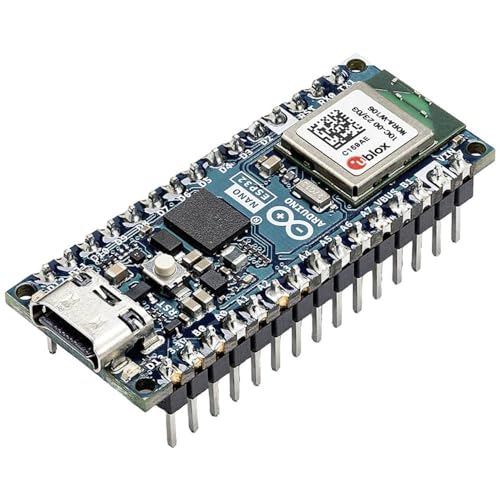
Arduino Nano ESP32 vs Nano R4: Which Board to Pick
The Arduino Nano ESP32 runs an ESP32-S3 with WiFi and Bluetooth for connected projects, while the Nano R4 runs a Renesas RA4M1 with CAN, DAC, and an OpAmp for control and measurement. The Nano ESP32 costs $20.99, the Nano R4 costs $14.99, and the R3 board costs $19.99. This guide compares the three boards and breadboard kit that holds them.
Quick facts
| Fact | Value |
|---|---|
| Nano ESP32 | $20.99, ESP32-S3, WiFi, Bluetooth, USB-C |
| Nano R4 | $14.99, Renesas RA4M1, 48MHz, USB-C |
| R3 board | $19.99, ATmega328P, 16U2, USB cable |
| DevKit V1 30-pin | $13.99, WROOM-32, WiFi, Bluetooth |
| DevKit V1 3-pack | $25.99, Type-C, CP2102, 30-pin |
| Breadboard kit | $14.99, 2x 830-point, 2x 400-point, jumpers |
| Nano R4 pins | 21 digital I/O, 8 analog, 6 PWM, DAC, CAN |
What does the Nano ESP32 give you?
The Nano ESP32 runs the ESP32-S3 with WiFi, Bluetooth, and USB-C in the Nano form factor.
It has headers fitted, so it plugs straight into a breadboard with no soldering.
It supports MicroPython and the Arduino IDE, and it works as a USB HID device.
Pick it for connected projects: sensors that report over WiFi, or a small web dashboard.
What does the Nano R4 give you?
The Nano R4 runs the Renesas RA4M1, a 48MHz Arm Cortex-M4 with 256kB flash and 32kB RAM.
It brings CAN, DAC, VRTC, and an OpAmp to the Nano pinout, which the ESP32 boards lack.
It has pre-soldered headers, a Qwiic connector, and a programmable RGB LED.
Pick it for control and measurement: motor drivers, analog sensors, and CAN bus projects.
Where does the R3 board fit?
The R3 board runs the ATmega328P with a 16U2 USB chip, the classic Arduino UNO layout.
It takes the same shields and sketches as the UNO R3, so old projects move over unchanged.
It ships with a USB cable in the box, ready to plug in and upload.
Pick it when a project calls for an UNO R3 and you want a fresh board at a low price.
30-pin or 38-pin DevKit: which one?
The DevKit V1 is a 30-pin board with the WROOM-32 module, narrow enough for a breadboard.
The DevKitC-32E is a 38-pin board with USB-C and 8MB flash, for projects that need more pins.
Both run WiFi and Bluetooth, and both work in the Arduino IDE.
Pick the 30-pin board for breadboarding, and the 38-pin board when the pin count matters.
How do you wire a Nano on a breadboard?
Plug the Nano into the breadboard kit with the USB port facing the edge.
The kit gives two 830-point boards and two 400-point boards, plus jumper wires.
Power the rail from USB while you test, then move to a 5V supply for the finished build.
Keep the Qwiic and I2C wires short, and tie all grounds to one rail.
How the options compare
| Board | Chip | Wireless | Interface | Price |
|---|---|---|---|---|
| Nano ESP32 | ESP32-S3 | WiFi, Bluetooth | USB-C | $20.99 |
| Nano R4 | Renesas RA4M1 | None | USB-C | $14.99 |
| R3 board | ATmega328P | None | USB (cable included) | $19.99 |
| DevKit V1 30-pin | ESP32-WROOM-32 | WiFi, Bluetooth | Micro USB | $13.99 |
| DevKit V1 3-pack | ESP32-WROOM-32 | WiFi, Bluetooth | Type-C | $25.99 |
How do you pick a Nano board in 4 steps?
- Decide if the project needs WiFi or Bluetooth, or wired control and measurement.
- Pick the Nano ESP32 for WiFi and Bluetooth, or the Nano R4 for CAN, DAC, and analog work.
- Pick the R3 board when a project calls for an UNO R3 layout and shields.
- Plug the board into the breadboard kit and test the sketch before you solder anything.
Parts that fit this guide
In-stock parts ship from the New York, USA warehouse in 1-2 business days. Prices below are the live store prices we verified on November 20, 2026.
Arduino Nano ESP32 with Headers [ABX00083], ESP32-S3, USB-C, WiFi, Bluetooth, HID Support, MicroPython ($20.99)
Nano ESP32 with headers at $20.99. It runs the ESP32-S3 with WiFi, Bluetooth, USB-C, and headers fitted.
Arduino Nano R4 with Headers [ABX00143], Renesas RA4M1, Pre-Soldered, Qwiic Connector, RGB LED ($14.99)
Nano R4 with headers at $14.99. It runs the Renesas RA4M1 with CAN, DAC, Qwiic, and a programmable RGB LED.
R3 Development Board, ATmega328P Microcontroller, 16U2 Interface, USB Cable ($19.99)
R3 board at $19.99. It runs the ATmega328P with a 16U2 USB chip and ships with a USB cable.
ESP32 DevKit V1 Development Board, 30-Pin WROOM-32, WiFi + Bluetooth, Dual-Core ($13.99)
DevKit V1 30-pin board at $13.99. It runs the WROOM-32 module with WiFi and Bluetooth, narrow enough for a breadboard.
ESP32 DevKit V1 Development Board 3-Pack, 30-Pin WROOM-32, Type-C, CP2102, WiFi + Bluetooth ($25.99)
DevKit V1 3-pack at $25.99. It is three 30-pin Type-C boards with CP2102 USB chips.
Solderless Breadboard Kit, 2 x 830-Point + 2 x 400-Point Boards + 126 Jumper Wires ($14.99)
Breadboard kit at $14.99. It has two 830-point boards, two 400-point boards, and jumper wires.
Shop the full range: Microcontrollers & Development at Quality RC Parts. See also: Related guide.
Frequently asked questions
Does the Nano ESP32 need an external antenna?
No. The Nano ESP32 has a built-in antenna for WiFi and Bluetooth, so it works out of the box.
Are the Nano R4 headers pre-soldered?
Yes. This Nano R4 version comes with headers pre-soldered, ready for breadboarding.
Will UNO R3 shields fit the R3 board?
Yes. The R3 board follows the UNO R3 layout, so shields and sketches carry over.
Which board has WiFi?
The Nano ESP32 and the DevKit V1 boards have WiFi and Bluetooth. The Nano R4 and the R3 board do not.
Do I need a breadboard kit?
A breadboard kit holds the Nano and the wiring for testing. The kit here has four boards and jumper wires.
Sources
Last updated: November 20, 2026.