
ESP32 vs ESP32-S3 vs ESP32-C3 vs ESP32-C6: Which Chip for Your Project
ESP32 vs ESP32-S3 is the first choice to make: pick the S3 for cameras, displays and on-device AI, and pick the original ESP32 for Bluetooth Classic or the widest tutorial base. Pick the ESP32-C3 for a low cost Wi-Fi sensor, and pick the ESP32-C6 for Matter, Thread and Zigbee work.
ESP32 vs ESP32-S3 vs ESP32-C3 vs ESP32-C6 at a glance
The table below gives the chip level numbers from the Espressif datasheets. Board level GPIO counts differ, because a small board breaks out fewer pins than the chip provides. Check your exact board pinout before you wire anything.
| Spec (unit) | ESP32 | ESP32-S3 | ESP32-C3 | ESP32-C6 |
|---|---|---|---|---|
| CPU core | Dual Xtensa LX6 | Dual Xtensa LX7 | Single RISC-V | Single RISC-V plus LP core |
| Max clock (MHz) | 240 | 240 | 160 | 160 |
| SRAM (KB) | 520 | 512 | 400 | 512 |
| GPIO pins (count) | 34 | 45 | 22 | 30 |
| Wi-Fi | Wi-Fi 4, 2.4 GHz | Wi-Fi 4, 2.4 GHz | Wi-Fi 4, 2.4 GHz | Wi-Fi 6, 2.4 GHz |
| Bluetooth | Classic plus BLE 4.2 | BLE 5 | BLE 5 | BLE 5.3 |
| 802.15.4 Thread/Zigbee | No | No | No | Yes |
| Native USB | No | USB OTG | USB Serial/JTAG | USB Serial/JTAG |
| PSRAM support | Up to 8 MB external | Up to 16 MB in package | No | No |
| ADC channels (count, bits) | 18, 12-bit | 20, 12-bit | 6, 12-bit | 7, 12-bit |
| DAC channels (count) | 2, 8-bit | 0 | 0 | 0 |
Sources for the table: Espressif ESP32 Series Datasheet v5.3, ESP32-S3 Series Datasheet v2.2 (2026-03-05), ESP32-C3 Series Datasheet v2.5, and ESP32-C6 Series Datasheet v1.6 (2026-11-10).
Which ESP32 chip should you choose first?
Start from the radio and the workload, not from the price. A board that costs a few dollars less is a false saving when it lacks the radio your project needs. Work through the three questions below in order. The first question that gives a single answer decides the chip.
First, do you need Thread, Zigbee or Matter? Only the ESP32-C6 in this group has an 802.15.4 radio. The C6 also brings Wi-Fi 6 on 2.4 GHz and Bluetooth 5.3. If your device must join a Matter fabric over Thread, the C6 is the only pick here. Second, do you need a camera, a parallel display or on-device AI? The ESP32-S3 is the pick. Its dual cores, PSRAM support and vector instructions handle camera frames and display buffers that starve the smaller chips. Third, do you need Bluetooth Classic, for audio streaming or a legacy serial link? Only the original ESP32 in this group has Bluetooth Classic. The S3, C3 and C6 offer Bluetooth LE only.
If none of those three questions decides it, you are choosing between a general purpose board and a low cost sensor node. The original ESP32 is the general purpose default, with 34 GPIO pins and the largest body of tutorials. The ESP32-C3 is the low cost sensor node, with 22 GPIO pins and a single RISC-V core at 160 MHz. That core is ample for reading sensors and posting data over Wi-Fi.
How do the CPUs compare?
The original ESP32 and the ESP32-S3 each have two Xtensa cores at up to 240 MHz. The ESP32 uses LX6 cores. The S3 uses LX7 cores with vector instructions that speed neural network and signal processing work. In practice, the S3 runs the same Wi-Fi stack on one core while your application code runs on the other, with headroom left for a display or a camera.
The ESP32-C3 and ESP32-C6 each have one RISC-V core at up to 160 MHz. A single core at 160 MHz reads sensors, drives a small display and holds a Wi-Fi connection without strain. It struggles only when you add a second heavy job, such as continuous audio processing or a camera stream. The C6 adds a low power RISC-V core at 20 MHz that can run while the main core sleeps, which suits battery powered sensors that wake on a schedule.
Clock speed alone misleads. The S3 at 240 MHz with two cores and 512 KB of SRAM does roughly twice the concurrent work of the C3 at 160 MHz with one core and 400 KB of SRAM. For a temperature logger the difference is invisible. For a camera it decides whether the project works at all.
What radios does each chip have?
All four chips have 2.4 GHz Wi-Fi. The ESP32, S3 and C3 use Wi-Fi 4. The C6 uses Wi-Fi 6, which improves efficiency on a busy 2.4 GHz network but does not add a 5 GHz band. None of these four chips has 5 GHz Wi-Fi. If your network is 5 GHz only, none of them connects, and you need a different board or a 2.4 GHz access point.
Bluetooth splits the group. The original ESP32 has Bluetooth Classic and Bluetooth LE 4.2. Bluetooth Classic matters for audio profiles and for older serial port profile links. The S3 has Bluetooth LE 5, the C3 has Bluetooth LE 5, and the C6 has Bluetooth LE 5.3. Bluetooth LE suits sensors, beacons and phone apps. It does not carry classic audio streaming.
The ESP32-C6 is the only chip here with an IEEE 802.15.4 radio, which carries Thread and Zigbee. Espressif positions the C6 for Matter end devices, over Wi-Fi or over Thread. If you are building a smart home sensor that must speak Matter over Thread, the C6 is the chip. The other three cannot add that radio in software.
How much GPIO, ADC and memory do you get?
GPIO count decides how many sensors, buttons and outputs a board can carry. The ESP32-S3 leads with 45 programmable GPIO pins at the chip level. The original ESP32 has 34. The ESP32-C6 has 30 in the QFN40 package and 22 in the QFN32 package, so check the exact module. The ESP32-C3 has 22. Small boards break out fewer pins than the chip has, so a C3 SuperMini exposes fewer usable pins than the 22 the chip provides. Read the board pinout for the exact board you hold.
ADC channels follow the same pattern. The original ESP32 has 18 ADC channels at 12-bit resolution across two ADC units, and ADC2 cannot be read while Wi-Fi runs. The S3 has 20 ADC channels at 12-bit. The C6 has 7 and the C3 has 6. If your project reads four or more analog sensors plus a battery voltage, the C3 runs out of analog pins fast, while the ESP32 and S3 have room to spare.
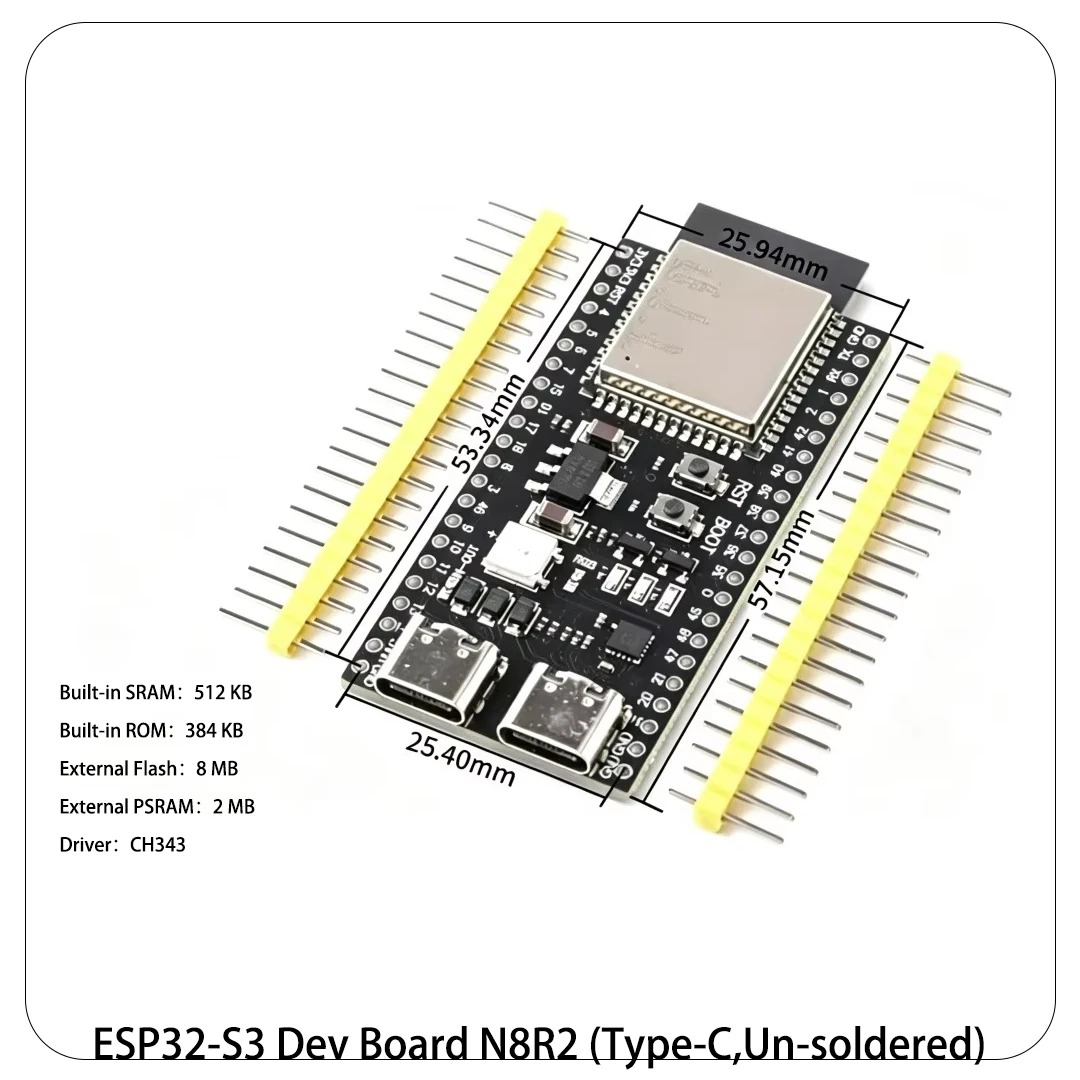
Memory decides frame buffers and display work. The original ESP32 has 520 KB of SRAM. The S3 has 512 KB plus support for up to 16 MB of PSRAM in package, which is what makes camera frames and large displays practical. The C6 has 512 KB of SRAM with no PSRAM support. The C3 has 400 KB with no PSRAM support. A camera frame at usable resolution needs PSRAM or a large SRAM buffer, which is why camera projects belong on the S3.
What about USB, DAC and touch?
Native USB splits the group in a way that matters every time you flash a board. The ESP32-S3 has full speed USB OTG, so it can act as a USB device or host, and it has a USB Serial/JTAG controller for flashing and debugging over one USB cable. The C3 and C6 have USB Serial/JTAG for flashing and debugging, but no full USB OTG peripheral. The original ESP32 has no native USB at all, so its boards carry a USB to serial chip such as the CP2102, and flashing goes through that chip.
DAC output exists only on the original ESP32 in this group, with two 8-bit DAC channels. The S3, C3 and C6 have no DAC. If your project needs a true analog voltage out, rather than a filtered PWM signal, the original ESP32 is the pick, or you add an external DAC chip to one of the others.
Touch sensing is available on the original ESP32 with 10 touch pins and on the S3 with 14 touch pins. The C3 and C6 have no capacitive touch peripheral in the same form. A touch button project is simpler on the ESP32 or the S3.
Which board should you buy for each project type?
Use this verdict table as a starting point, then check the pinout post for the exact board before you order. Each verdict names the chip and the reason in one line.
| Project type | Pick this chip | Why |
|---|---|---|
| Camera or AI vision | ESP32-S3 | PSRAM, dual cores, camera interface, vector instructions |
| Colour display or HMI | ESP32-S3 | PSRAM and LCD interface, 45 GPIO pins |
| Matter, Thread or Zigbee | ESP32-C6 | Only chip here with 802.15.4, plus Wi-Fi 6 |
| Low cost Wi-Fi sensor | ESP32-C3 | Single core is ample, 22 GPIO pins, USB flashing |
| Bluetooth Classic audio or SPP | ESP32 | Only chip here with Bluetooth Classic |
| General purpose learning board | ESP32 | 34 GPIO pins, DAC, touch, largest tutorial base |
| Battery sensor with deep sleep | ESP32-C6 | Low power core, 7 uA deep sleep class |
The boards in stock that match these picks are linked in the parts section below. The ESP32 DevKit V1 is the original ESP32 board. The ESP32-S3 DevKitC-1 is the S3 board. The ESP32-C3 SuperMini and the ESP32-C6 SuperMini are the small form factor C3 and C6 boards.
What mistakes do builders make when they pick?
The first mistake is buying the C3 for a camera. The C3 has no camera interface and no PSRAM, so a camera project on a C3 fails at the hardware level, not in code. The second mistake is buying the S2 or C3 for Bluetooth Classic audio. Those chips have no Bluetooth Classic radio, and no library adds one. The third mistake is buying the original ESP32 for a Matter over Thread device. It has no 802.15.4 radio.
The fourth mistake is counting chip GPIO pins instead of board pins. A SuperMini board breaks out a subset of the chip pins, and some chip pins are used by flash memory or the USB circuit. Read the pinout post for your exact board variant and count the broken out, usable pins. The fifth mistake is ignoring the ADC2 and Wi-Fi conflict on the original ESP32. If your sensor sits on an ADC2 pin, readings stop when Wi-Fi starts. Move the sensor to an ADC1 pin, GPIO 32 to 39.
For the board behind this comparison, start with the ESP32 DevKit V1 guide: how to use the board for WiFi projects.
FAQ
Which ESP32 is best for beginners?
The original ESP32 DevKit V1 is the safest first board. It has 34 GPIO pins, Bluetooth Classic and BLE, a DAC and touch pins, and the largest set of tutorials. Start there unless a radio requirement points at another chip.
Is the ESP32-S3 better than the ESP32?
The S3 is faster for camera, display and AI work because of its dual LX7 cores, PSRAM support and vector instructions. It is not better for Bluetooth Classic audio, because it has no Bluetooth Classic radio, and it has no DAC.
Can the ESP32-C3 run a camera?
No. The C3 has no camera interface and no PSRAM support, so it cannot hold camera frames. Use the ESP32-S3 for camera projects.
Does the ESP32-C6 have Wi-Fi 6 on 5 GHz?
No. The C6 has Wi-Fi 6 on 2.4 GHz only. It has no 5 GHz radio. Its advantage is Wi-Fi 6 efficiency plus the 802.15.4 radio for Thread and Zigbee.
Can I use the same Arduino code on all four chips?
Most Arduino code ports across the four chips with a board selection change, because the Arduino core supports all of them. Code that uses chip specific features, such as the DAC on the original ESP32 or the camera interface on the S3, does not port.
Parts used
ESP32 DevKit V1 Development Board, 30-Pin WROOM-32: the original ESP32 board for general purpose projects and Bluetooth Classic work. ESP32-S3 Development Board DevKitC-1 N8R2 N16R8: the S3 board for camera, display and AI projects, with PSRAM options. ESP32-C3 SuperMini Development Board, 4-Pack: the low cost C3 board for Wi-Fi sensor nodes. ESP32-C6 SuperMini Development Board, 2-Pack: the C6 board for Matter, Thread and Zigbee projects.
Sources
- Espressif ESP32 Series Datasheet v5.3
- Espressif ESP32-S3 Series Datasheet v2.2
- Espressif ESP32-C3 Series Datasheet v2.5
- Espressif ESP32-C6 Series Datasheet v1.6
- Espressif ESP-IDF ADC guide, ESP32 ADC1 and ADC2 channels
Last updated: 2026-11-21. Search volume: not verified. Product links use the store short link form with the product ID; confirm the product slug at publish time.