
How to Choose STM32 Development Boards for Arduino Work
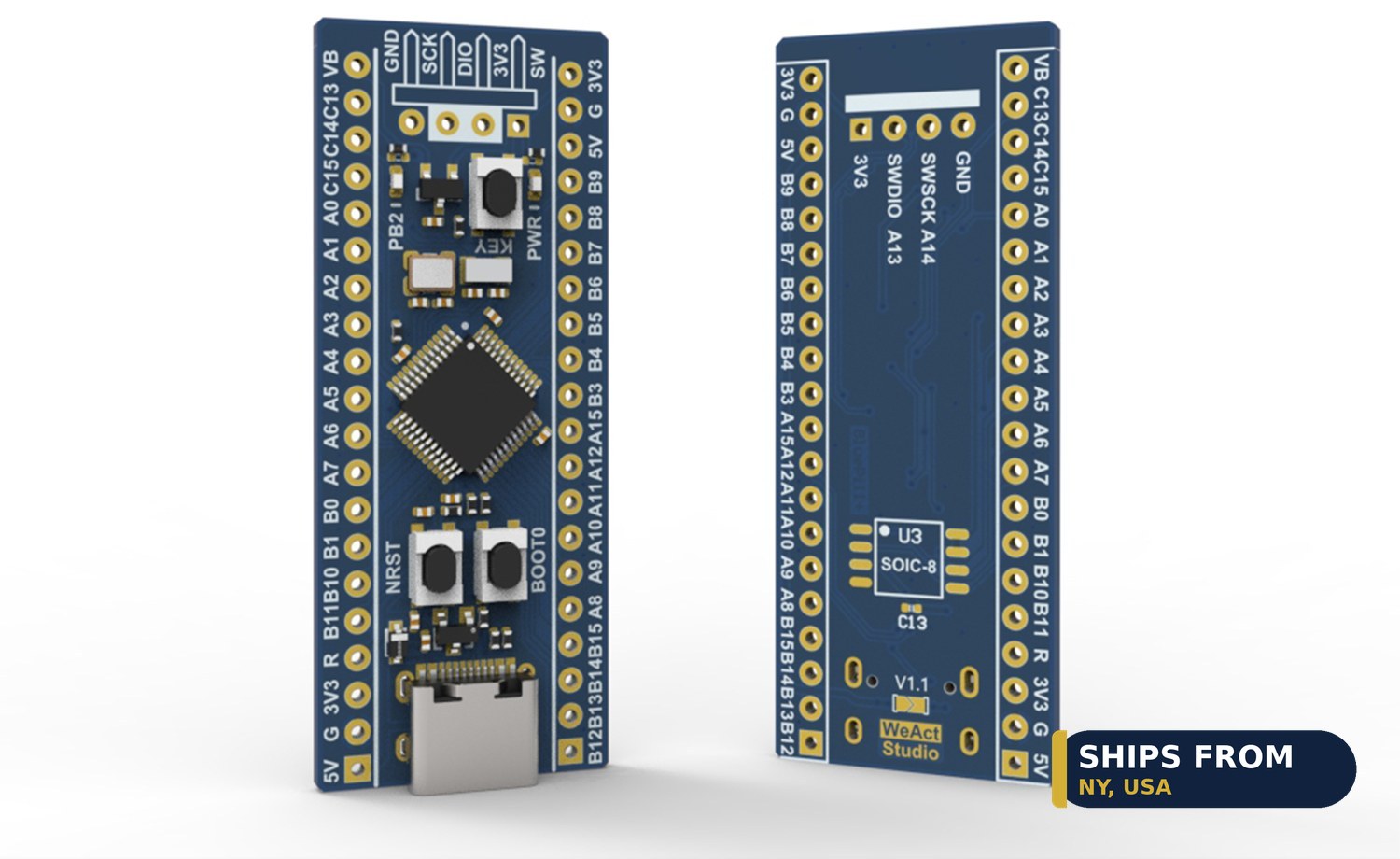
Choose the BluePill Plus board when you want STM32 power with Arduino code. It carries an ARM Cortex-M3 chip at 72MHz with USB-C and SWD debug. The C8T6 version gives 64KB of flash for $11.48, while the CBT6 gives 128KB for $13.08. The board runs through the STM32duino Arduino core.
Quick facts
| Fact | Value |
|---|---|
| BluePill C8T6 | $11.48, 64KB flash, 72MHz |
| BluePill CBT6 | $13.08, 128KB flash, 72MHz |
| Chip | STM32F103, ARM Cortex-M3 |
| Ports | USB-C, SWD debug |
| Arduino support | STM32duino Arduino core |
| UNO comparison | ATmega328P, 16MHz, $9.27 |
What is on the BluePill Plus board?
The BluePill Plus carries an STM32F103 chip with an ARM Cortex-M3 core at 72MHz. That is faster than the 16MHz ATmega328P on the UNO.
It gives USB-C and SWD debug on the board. SWD lets you step through code on the chip while it runs.
The board costs $11.48 for the C8T6 version. It suits coders who outgrow 8-bit boards.
C8T6 or CBT6: which flash size fits your sketch?
The C8T6 version gives 64KB of flash for $11.48. It suits small sketches and sensor jobs.
The CBT6 version gives 128KB of flash for $13.08. It suits larger sketches with more code and data.
Both versions run at 72MHz with USB-C and SWD. Pick the CBT6 when your sketch outgrows 64KB.
How do you program the board with Arduino?
Install the STM32duino Arduino core in the Arduino IDE. The core adds STM32 boards to the board menu.
Pick the matching STM32F103 model in the IDE before you load code. The wrong model gives a failed upload.
The STM32duino project documents the core and its board options. Load a blink sketch first to confirm the setup.
How does the BluePill compare with the UNO and Nano?
The UNO R3 gives an ATmega328P chip at 16MHz with 14 digital pins. It costs from $9.27 and suits first projects.
The Nano 3.0 gives an ATmega328PB chip with Type-C USB for $10.96. It suits small builds where a full UNO will not fit.
The BluePill gives 72MHz and up to 128KB of flash. Pick it when your code needs speed and room.
When should you pick a WiFi board instead?
Pick the S2 Mini at $11.16 when the project needs WiFi. It gives 4MB of flash and 2MB of PSRAM over USB-C.
Pick the NodeMCU ESP8266 at $11.37 when you want WiFi and a display on one board. It carries an ESP-12E chip with a built-in OLED.
The BluePill gives no WiFi radio in its listing. Use it for wired control jobs with no radio need.
How the options compare
| Board | Chip | Speed and flash | Price |
|---|---|---|---|
| BluePill C8T6 | STM32F103C8T6 | 72MHz, 64KB flash | $11.48 |
| BluePill CBT6 | STM32F103CBT6 | 72MHz, 128KB flash | $13.08 |
| UNO R3, Type-C | ATmega328P | 16MHz, 14 digital pins | $9.27 |
| Nano 3.0 | ATmega328PB | Type-C, small case | $10.96 |
| S2 Mini, 1-pack | ESP32-S2FN4R2 | 4MB flash, 2MB PSRAM, WiFi | $11.16 |
| RP2040 Pro Micro | RP2040 | Dual-core, 16MB flash, USB-C | $8.37 |
| NodeMCU ESP8266 | ESP-12E | WiFi, built-in 0.96 inch OLED | From $11.37 |
How do you start with the BluePill Plus board?
- Pick the C8T6 or CBT6 version at checkout.
- Install the STM32duino Arduino core in the Arduino IDE.
- Pick the matching STM32F103 model in the IDE.
- Connect the board over USB-C.
- Load a blink sketch to confirm the setup.
- Wire your sensor and load the project sketch.
Parts that fit this guide
In-stock parts ship from the New York, USA warehouse in 1-2 business days. Prices below are the live store prices we verified on November 10, 2026.
BluePill Plus STM32F103C8T6 / STM32F103CBT6 ARM Cortex-M3 Development Board, USB-C ($11.48)
BluePill Plus board at $11.48 for 64KB flash. It carries an ARM Cortex-M3 chip at 72MHz with USB-C and SWD debug.
UNO R3 Compatible Development Board, ATmega328P CH340G – USB / Type-C ($9.27)
UNO R3 compatible board at $9.27 to $10.64 by version. It carries an ATmega328P chip, runs at 16MHz, and gives 14 digital pins and 6 analog inputs.
Arduino Nano 3.0 Compatible Development Board, Type-C USB, ATmega328PB, CH340C ($10.96)
Arduino Nano 3.0 board at $10.96. It carries an ATmega328PB chip with a CH340C USB-serial chip and Type-C USB.
ESP32-S2 Mini Development Board, WiFi, 4MB Flash, 2MB PSRAM, USB-C ($11.16)
ESP32-S2 Mini at $11.16 for a 1-pack. It gives 4MB of flash and 2MB of PSRAM with WiFi over USB-C.
RP2040 Pro Micro Development Board, 16MB Flash, USB-C, QMK Compatible ($8.37)
RP2040 Pro Micro at $8.37. It gives a dual-core RP2040 chip with 16MB of flash, USB-C, and BOOT and RESET buttons.
NodeMCU ESP8266 Development Board with 0.96″ OLED Display, ESP-12E, Micro USB ($11.37)
NodeMCU ESP8266 board at $11.37. It carries an ESP-12E chip with a built-in 0.96 inch SSD1306 OLED display.
Shop the full range: STM32 Development Boards at Quality RC Parts. See also: Related guide.
Frequently asked questions
How much flash does the BluePill give?
The C8T6 gives 64KB for $11.48, and the CBT6 gives 128KB for $13.08.
Does the BluePill work with the Arduino IDE?
Yes. It runs through the STM32duino Arduino core, which adds STM32 boards to the IDE.
Is the BluePill faster than the UNO?
Yes. The BluePill runs at 72MHz, while the UNO runs at 16MHz.
Does the BluePill have WiFi?
No WiFi radio is named in the board listing. Pick the S2 Mini at $11.16 when the project needs WiFi.
Sources
Last updated: November 10, 2026.