
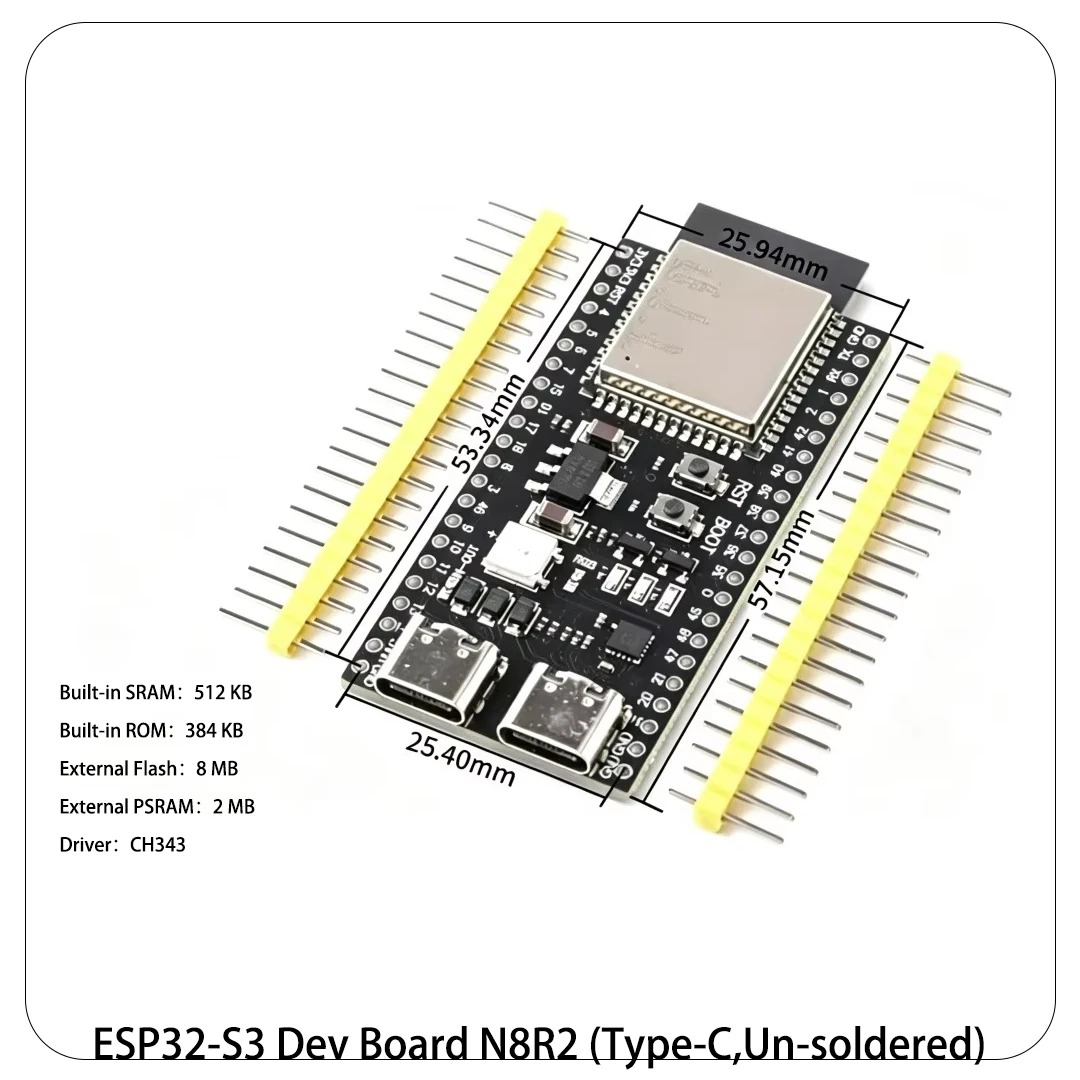
ESP32-S2 vs ESP32-S3: USB, Bluetooth, and Camera Compared
Pick the ESP32-S3 for most new projects. It adds a second core, Bluetooth LE, more SRAM, PSRAM support and vector instructions to the same Wi-Fi and native USB base as the S2. Pick the ESP32-S2 only when you need Wi-Fi plus native USB without Bluetooth, or when you need its built in DACs.
ESP32-S2 vs ESP32-S3 at a glance
The table below uses the Espressif ESP32-S2 Series Datasheet v1.9 and the Espressif ESP32-S3 Series Datasheet v2.2 (2026-03-05).
| Spec (unit) | ESP32-S2 | ESP32-S3 |
|---|---|---|
| CPU | Single Xtensa LX7 | Dual Xtensa LX7 |
| Max clock (MHz) | 240 | 240 |
| SRAM (KB) | 320 | 512 |
| GPIO pins (count) | 43 | 45 |
| Wi-Fi | Wi-Fi 4, 2.4 GHz | Wi-Fi 4, 2.4 GHz |
| Bluetooth | None | BLE 5 |
| USB | USB OTG full speed | USB OTG full speed plus USB Serial/JTAG |
| PSRAM | Up to 2 MB external | Up to 16 MB in package |
| ADC channels (count, bits) | 20, 12-bit | 20, 12-bit |
| DAC channels (count) | 2, 8-bit | 0 |
| Vector instructions | No | Yes, 128-bit SIMD |
| Camera interface | Yes, DVP 8 to 16 bit (via I2S, up to 40 MHz) | Yes, DVP 8 to 16 bit |
| Touch pins (count) | 14 | 14 |
How do the CPUs compare?
Both chips use the Xtensa LX7 architecture at up to 240 MHz. The difference is core count: the S2 has one LX7 core and the S3 has two. A single core at 240 MHz handles a Wi-Fi connection plus a sensor task without strain. Two cores handle that same load plus a display, a camera or an audio pipeline at the same time.
The S3 also has 512 KB of SRAM against 320 KB on the S2. That 192 KB gap matters when a project holds a display buffer or a network buffer plus application state. The S3 adds 128-bit vector instructions that speed neural network and signal processing work. The S2 has no vector unit, so on-device AI runs slower or not at all.
For a simple Wi-Fi sensor that wakes, reads and posts, the second core is invisible. For a project that streams, displays and networks at once, the second core is the difference between smooth operation and dropped frames.
What is the Bluetooth difference?
The ESP32-S2 has no Bluetooth radio at all. It cannot do Bluetooth LE, Bluetooth Classic, beacons or phone pairing, and no software adds a radio that is not on the chip. The ESP32-S3 has Bluetooth LE 5, with 1 Mbps, 2 Mbps and coded PHY data rates plus extended advertising. It does not have Bluetooth Classic, so classic audio streaming and classic serial port profile links are still out.
This is the most common reason a builder regrets an S2 pick. A Wi-Fi sensor that later gains a phone app for setup needs Bluetooth LE for provisioning, and the S2 cannot provide it. If there is any chance your project will need Bluetooth, buy the S3. The price gap between S2 and S3 boards is small, and a board swap late in a project costs far more.
How does USB compare?
Native USB is the shared strength of both chips. The S2 and the S3 each have a full speed USB OTG peripheral with an integrated transceiver. Either chip can act as a USB device, such as a keyboard, a MIDI device or a serial port, or as a USB host that reads a flash drive or a keyboard. That is a step up from the original ESP32, which needs an external USB to serial chip for every USB connection.
The S3 adds a USB Serial/JTAG controller, which gives flashing and debugging over the same USB cable without a separate debug probe. The S2 has USB OTG but no dedicated Serial/JTAG controller, so its debug path is less direct. For a USB gadget project, both chips work. For a USB gadget that also needs debugging over USB, the S3 is the smoother board.
Which chip handles cameras and displays?
Both chips have a DVP camera interface at 8 to 16 bit, implemented with the I2S hardware, so the S2 can run a camera. The S3 is still the camera pick in this pair. It has an LCD interface, PSRAM support up to 16 MB in package, dual cores and the vector instructions that make image work practical. A camera frame needs a buffer that the S2 struggles to hold: the S2 has 320 KB of SRAM and only up to 2 MB of external PSRAM, and it lacks the LCD interface and the vector unit that the S3 uses for image work.
Displays follow the same split. A small SPI display works on either chip. A large parallel RGB display with a frame buffer needs the S3 PSRAM and LCD interface. If your project has a large display, the S3 is the only pick in this pair. If it has a small SPI OLED or TFT, either chip works, and the S2 is the cheaper board.
What does the S2 still do better?
The S2 has two built in 8-bit DAC channels, which the S3 lacks. A project that needs a true analog voltage output, such as a simple waveform generator or a control voltage, can use the S2 DAC directly, while the S3 needs an external DAC chip or a filtered PWM signal. The S2 DACs are DAC_1 on GPIO 17 and DAC_2 on GPIO 18 in the S2 datasheet. That DAC difference is the one S2 advantage that decides a real project.
The S2 also suits a Wi-Fi only USB device with no Bluetooth requirement, such as a USB sensor dongle or a Wi-Fi to USB bridge. Its single core and lower SRAM are ample there, and its 43 GPIO pins are only two fewer than the S3. An existing S2 design that works should stay on the S2; a redesign to the S3 buys nothing if the project uses neither Bluetooth nor a camera.
Which board should you pick?
| Project type | Pick this chip | Why |
|---|---|---|
| Camera or AI vision | ESP32-S3 | Both have DVP, S3 adds PSRAM, LCD interface and vector instructions |
| Bluetooth LE sensor or beacon | ESP32-S3 | S2 has no Bluetooth radio |
| Colour display or HMI | ESP32-S3 | PSRAM and LCD interface |
| USB keyboard, MIDI or HID | Either, S3 preferred | Both have USB OTG; S3 adds Serial/JTAG debug |
| Wi-Fi only sensor, no Bluetooth | ESP32-S2 | Single core is ample, lower cost, 43 GPIO pins |
| Analog voltage output | ESP32-S2 | Built in DACs, two 8-bit channels |
| Existing S2 design in production | ESP32-S2 | No redesign cost when Bluetooth and camera are not needed |
How do you migrate a project from S2 to S3?
Migrating a project from the ESP32-S2 to the ESP32-S3 is mostly a board selection change, because both chips run the same Arduino core and the same ESP-IDF. Start by listing the pins your S2 project uses and mapping each one to the S3 board, because the pin numbers differ between the S2 Mini and the S3 DevKitC-1. Check the strapping pins on the new board before you wire anything, and move any sensor off a pin that is a strapping pin on the S3.
Next, check the libraries. Code that uses Wi-Fi, I2C, SPI, UART and USB OTG ports across both chips with no change, because the APIs are the same. Code that uses the S2 DAC needs a rework, because the S3 has no DAC: replace the DAC output with a filtered PWM signal or an external DAC chip. Code that uses Bluetooth needs a fresh start on the radio side, because the S2 had no Bluetooth stack to port from, so add the BLE setup from an S3 example and test it on the bench.
Then check memory and partitions. The S3 has 512 KB of SRAM against 320 KB on the S2, and its DevKitC-1 boards offer 8 MB or 16 MB of PSRAM, so a project that was tight on the S2 has room to breathe. Raise the display buffer or the network buffer only after the basic port works, and test the migrated project on the bench before you deploy it. Wi-Fi signal strength, boot behaviour and deep sleep wake timing all differ between the chips, and a project that worked on the S2 can behave differently on the S3 if a pin that was safe on one board is a strapping pin on the other.
For the S2 pins in this comparison, see the ESP32-S2 Mini pinout guide.
FAQ
Does the ESP32-S2 have Bluetooth?
No. The ESP32-S2 has no Bluetooth radio. If your project needs Bluetooth LE, choose the ESP32-S3.
Is the ESP32-S3 better than the S2 for Wi-Fi?
Wi-Fi itself is the same on both chips: 2.4 GHz Wi-Fi 4. The S3 is better at everything around the Wi-Fi, because it has a second core, more SRAM and Bluetooth LE.
Can the ESP32-S2 run a camera?
Yes. The S2 has a DVP 8 to 16 bit camera interface, implemented with the I2S hardware, with a clock up to 40 MHz. It holds smaller frames than the S3, because it has only 320 KB of SRAM and up to 2 MB of external PSRAM, and it has no LCD interface or vector unit. Camera projects that need large frames belong on the S3.
Do both chips have native USB?
Yes. Both have full speed USB OTG, so either can act as a USB device or host. The S3 adds a USB Serial/JTAG controller for flashing and debugging.
Should I upgrade an S2 project to the S3?
Upgrade when the project gains Bluetooth, a camera, a large display or AI work. Keep the S2 when the project is a working Wi-Fi only USB device with no new radio or display requirement.
Parts used
ESP32-S2 Mini Development Board: the S2 board for Wi-Fi only USB projects. ESP32-S3 Development Board DevKitC-1 N8R2 N16R8: the S3 board for camera, display, Bluetooth and AI projects.
Sources
- Espressif ESP32-S2 Series Datasheet v1.9
- Espressif ESP32-S3 Series Datasheet v2.2
- Espressif ESP32 Series Datasheet v5.3
- ESP32 comparison table, chip level values from Espressif datasheets
Last updated: 2026-11-21. Search volume: not verified. Product links use the store short link form with the product ID; confirm the product slug at publish time.