
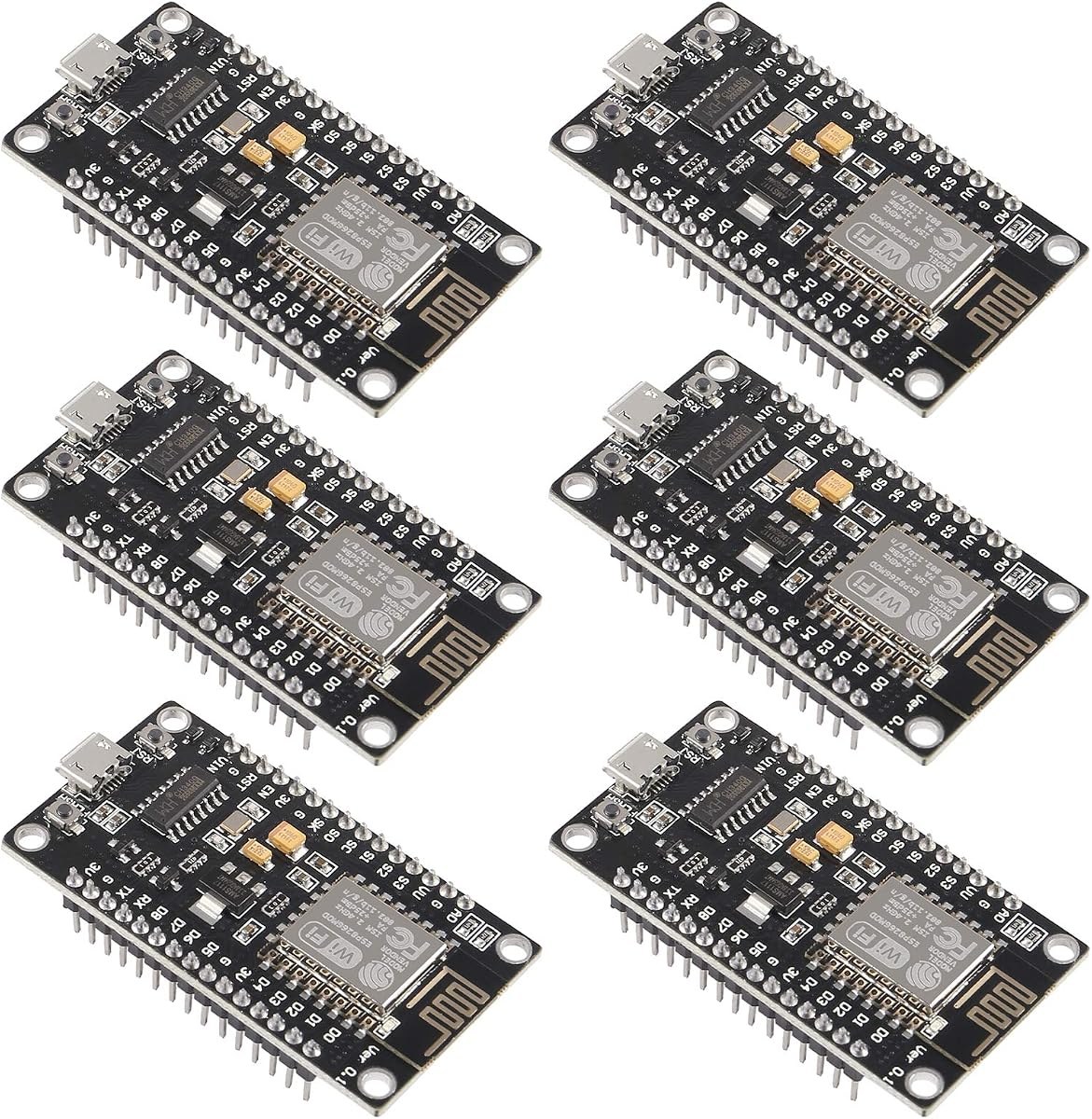
All four NodeMCU boards in this guide share the same core: an ESP8266 with the ESP-12E module, WiFi networking, and support for the Arduino IDE. What differs is the USB to serial chip, the pack size, and small setup details that change how smooth the first flash is. This guide compares CH340 and CP2102 boards directly, using the listed specifications, so you can pick the right pack for your bench.
CH340 vs CP2102: what changes
The USB to serial chip is the part of the board that talks to your computer when you upload code. CH340 boards need a driver install step: install the CH340 driver if the computer does not see the board. CP2102 boards use the CP2102 USB to serial interface instead. Both chip types appear here with Micro-USB and flash and reset switches on some boards, and both work with the Arduino development platform, Mongoose IoT, and MicroPython on the boards that list those environments. The practical difference is setup friction, not WiFi capability, since all four boards list the ESP-12E module and self-contained WiFi networking.
| Board | USB chip | Flash | USB and switches | Setup note |
|---|---|---|---|---|
| ESP8266 NodeMCU CH340 6-pack | CH340 | 4 MB | Not stated | Install the CH340 driver if the computer does not see the board |
| ESP8266 NodeMCU CH340 10-pack | CH340 | 4 MB | Micro-USB, flash and reset switches | Install the CH340 driver if the computer does not see the board |
| HiLetgo ESP8266 NodeMCU CP2102 3-pack | CP2102 | Not stated | Micro-USB, flash and reset switches | 80 MHz CPU listed |
| ESP8266 NodeMCU CP2102 3-pack | CP2102 | Not stated | Not stated | No button presses needed before flashing |
The CH340 boards
ESP8266 NodeMCU CH340 6-pack
The ESP8266 NodeMCU CH340 6-pack includes six ESP8266 NodeMCU LUA development boards with the CH340 USB chip and ESP-12E module, with 4 MB of flash. The ESP8266 integrates with sensors and other devices through its GPIOs and offers a complete self-contained WiFi networking solution, either hosting the application or offloading WiFi networking from another processor. The listing notes the boards work for small temperature and humidity monitors in home automation projects and are compatible with the Arduino development platform. Six boards suit a home sensor build with spares, or several small projects at once.
ESP8266 NodeMCU CH340 10-pack
The ESP8266 NodeMCU CH340 10-pack includes ten of the same style of board: CH340 USB chip, ESP-12E WiFi serial wireless module, and 4 MB of flash. Built-in Micro-USB with flash and reset switches makes programming easy, and the boards need minimal external circuitry. They are compatible with Arduino IDE, Mongoose IoT, and MicroPython. Ten boards cover a classroom set, a multi-node sensor network, or a workshop shelf where every student or node gets its own board. The driver note applies here too: install the CH340 driver if the computer does not see the board.
The CP2102 boards
HiLetgo ESP8266 NodeMCU CP2102 3-pack
The HiLetgo ESP8266 NodeMCU CP2102 3-pack includes three open-source ESP8266 NodeMCU development boards with the ESP-12E module and a CP2102 USB to serial interface. Built-in Micro-USB with flash and reset switches makes programming easy, and the boards work with the latest Arduino IDE, Mongoose IoT, and MicroPython. The listing states an 80 MHz CPU. Pick this pack when you want the CP2102 interface with on-board flash and reset switches for programming control.
ESP8266 NodeMCU CP2102 3-pack, no button presses
The ESP8266 NodeMCU CP2102 3-pack includes three ESP8266 NodeMCU development boards with the ESP-12E module and a CP2102 USB interface. Its standout setup detail is that the CP2102 interface programs the board without pressing the flash and reset buttons before each flash operation. NodeMCU is open-source Lua based firmware for the ESP8266, for low cost wireless modules and rapid prototyping. The boards are compatible with Arduino IDE, Mongoose IoT, and MicroPython. Pick this pack when you want the smoothest flash routine: plug in, select the board, and upload.
Driver notes, stated plainly
For CH340 boards, the stated step is to install the CH340 driver if the computer does not see the board. Do that before assuming a board is faulty. For the CP2102 boards, the listings state no equivalent driver step, and the ESP8266 NodeMCU CP2102 3-pack adds that no button presses are needed before flashing. If you are setting up a classroom or a workshop, that difference adds up across many boards and many uploads. If you already have the CH340 driver installed and working, the CH340 packs are a straightforward pick with the larger pack sizes and the stated 4 MB of flash.
Pack sizes: 3, 6, and 10
- 3-pack. The two CP2102 packs give three boards each. That suits one project plus spares, or a first buy to test the NodeMCU workflow.
- 6-pack. The ESP8266 NodeMCU CH340 6-pack gives six CH340 boards with 4 MB of flash, which suits several sensor nodes or a small home automation build.
- 10-pack. The ESP8266 NodeMCU CH340 10-pack gives ten CH340 boards with 4 MB of flash, Micro-USB, and flash and reset switches, which suits a classroom, a club, or a multi-node deployment.
Which NodeMCU to buy
- Choose the ESP8266 NodeMCU CP2102 3-pack for the easiest flashing routine, with no button presses needed before each flash.
- Choose the HiLetgo ESP8266 NodeMCU CP2102 3-pack for a CP2102 board with flash and reset switches on board.
- Choose the ESP8266 NodeMCU CH340 6-pack for six CH340 boards with 4 MB of flash at a middle pack size.
- Choose the ESP8266 NodeMCU CH340 10-pack for ten CH340 boards with 4 MB of flash, Micro-USB, and flash and reset switches.
All four boards share the ESP-12E module and WiFi networking, so the choice is about the USB chip, the setup routine, and how many boards the project needs. Start with a blink sketch, then a WiFi scan, then a small sensor project such as a temperature and humidity monitor.
Further reading
For a display project on this platform, read the NodeMCU ESP8266 OLED guide. For the smaller ESP-01S modules and their programmer adapters, read ESP-01 and ESP-01S getting started.
Related guides
Orders earn QRC Rewards points.
Shipped fast and securely from our secure facility in New York, providing fast, high quality USA shipping.