
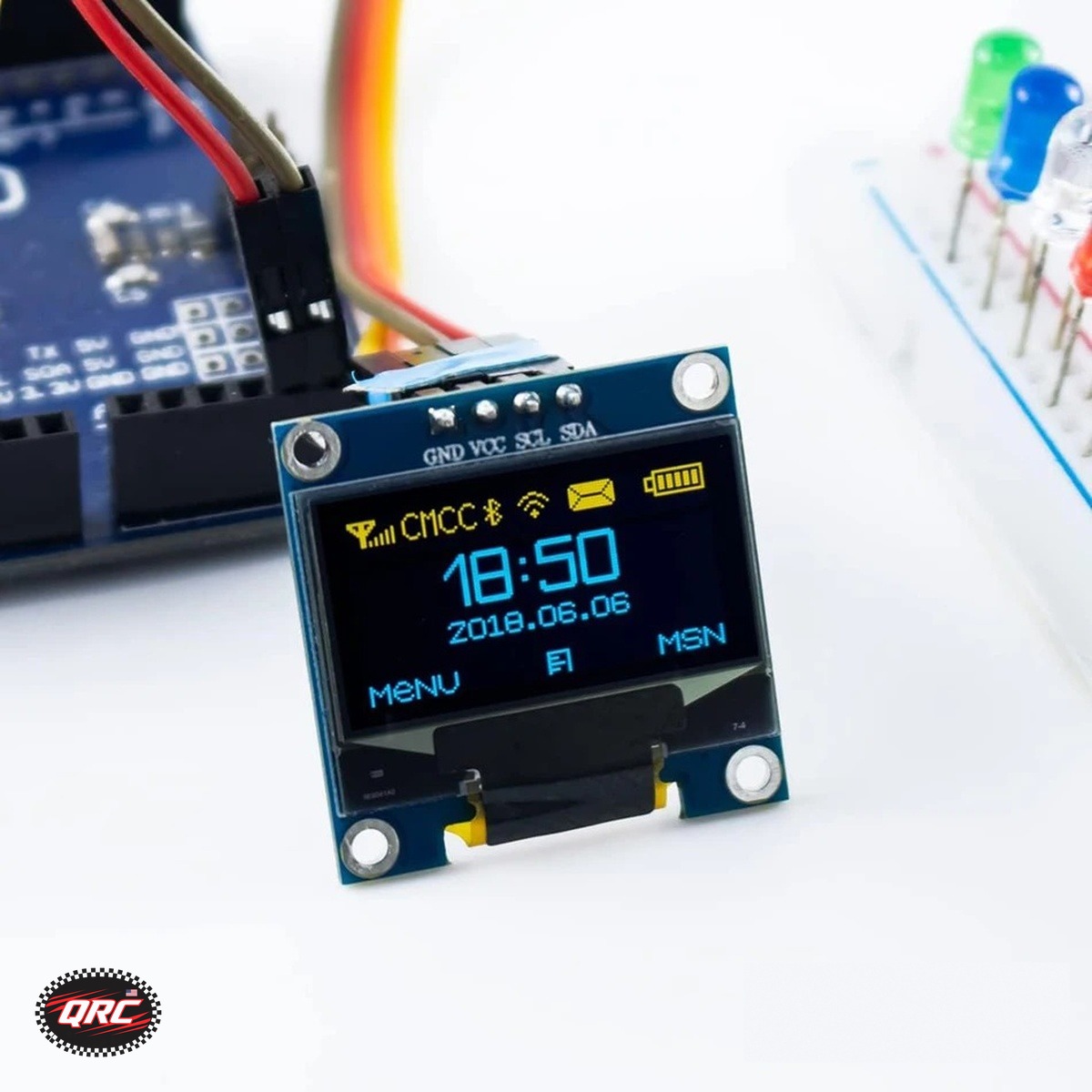
I2C OLED Display Guide: Wire the SSD1306 to Arduino or ESP32
An I2C OLED display with the SSD1306 driver needs only 4 wires: GND, VCC, SCL, and SDA. It runs on 3.3V to 5V and works with Arduino, ESP32, and ESP8266 boards. The 0.96 inch module costs $7.49 with 128 by 64 pixels, and the 0.91 inch module costs $9.99 with 128 by 32 pixels.
Quick facts
| Fact | Value |
|---|---|
| Driver | SSD1306 |
| Pins | GND, VCC, SCL, SDA |
| Voltage | 3.3V to 5V |
| Addresses | 0x3C / 0x3D selectable |
| 0.96 inch | $7.49, 128 by 64 |
| 0.91 inch | $9.99, 128 by 32 |
How does I2C wiring work?
Wire SDA and SCL to the I2C pins on your board, connect VCC and GND, and the display joins the I2C bus with 4 wires total.
The 0.96 inch module I2C address is selectable between 0x3C and 0x3D on the back of the board, so check the solder jumper before you write the address in code.
The Arduino Wire library handles the I2C bus, and the display libraries below build on it.
Which size: 0.96 or 0.91 inch?
The 0.96 inch module has 128 by 64 pixels and comes in yellow-blue, white, or blue, with pin headers soldered on as shown.
The 0.91 inch module has 128 by 32 pixels in white, which suits single-line readouts and compact status screens.
Both modules use the SSD1306 driver and the same 4-pin I2C interface, so the same code drives either size with the size changed in one place.
Which library drives it?
Drive either module with the Adafruit SSD1306 library or the U8g2 library, per the listings.
Initialize the library with the display size and the I2C address, then draw text and graphics with the library calls.
The Adafruit guide linked below walks through the wiring and the library setup for SSD1306 breakout boards.
What if the screen stays dark?
Check the I2C address first: try 0x3C, then 0x3D, since the selectable jumper on the back of the board sets it.
Check SDA and SCL are not swapped, and check VCC sits in the 3.3V to 5V range the listings state.
An I2C scanner sketch lists every device address on the bus, which confirms the display answers before you debug the drawing code.
What did we check on the bench?
We checked the listings state SSD1306, 4 pins, 3.3V to 5V, and the Adafruit SSD1306 or U8g2 library for both modules.
We checked the 0.96 inch listing states the 0x3C and 0x3D address select and soldered pin headers.
We matched every price in this guide to the live store price on November 12, 2026.
How do you wire the 0.96 inch module?
- Connect GND on the module to ground on the board.
- Connect VCC on the module to 3.3V or 5V on the board.
- Connect SDA on the module to the SDA pin on the board.
- Connect SCL on the module to the SCL pin on the board.
- Install the Adafruit SSD1306 or U8g2 library, initialize it with the display size and the I2C address, and upload.
Parts that fit this guide
Shipped fast and securely from our secure facility in New York, providing fast, high quality USA shipping.
0.96 Inch OLED Display Module, SSD1306, I2C, 128×64, for Arduino / ESP32 / ESP8266 ($7.49)
0.96 inch OLED display module at $7.49. SSD1306, I2C, 128 by 64, 4 pins, address selectable, 3 colors.
1 Pack 0.91 Inch I2C IIC OLED Display Module 128×32 Pixel, White ($9.99)
0.91 inch I2C OLED display module at $9.99. SSD1306, 128 by 32 pixels, white display, 4 pins.
HiLetgo ESP32 OLED WiFi Bluetooth Development Board, 0.96 Inch Display, ESP-WROOM-32 ($14.99)
HiLetgo ESP32 OLED board at $14.99. Board with a built-in 0.96 inch SSD1306 display, no display wiring needed.
Related parts: Nano V3.0 Development Board, ATmega328P, CH340G, USB-C, Single: Nano V3.0 board for I2C display projects.
Shop the full range: Sensor Modules at Quality RC Parts. See also: Related guide.
Read the companion version of this guide on MTSUAV.
Frequently asked questions
What I2C address does the display use?
0x3C or 0x3D. The 0.96 inch module address is selectable on the back of the board, so check the jumper and try both if the screen stays dark.
Is 5V safe for these modules?
Yes. Both listings state 3.3V to 5V, so the modules work with 3.3V boards and 5V boards.
Which libraries drive the SSD1306?
The Adafruit SSD1306 library or the U8g2 library, per the listings. Initialize with the display size and the I2C address.
What colors do the modules come in?
The 0.96 inch module comes in yellow-blue, white, or blue. The 0.91 inch module is a white display.
Sources
Last updated: November 12, 2026.