
BirdBox Build Start to Finish: ESP32-S3-CAM N16R8, NoIR Camera, and 850nm IR
A BirdBox is a nest box with a camera inside it, and the build is simpler than it looks: one board, one night-vision camera module, one IR light, and a card to record on. The hard part is not the wiring, it is getting the camera to see in the dark. A standard camera module goes blind inside a closed box. This build uses the NoIR module and 850nm IR light, so the camera sees the nest day and night.
This guide builds the box start to finish: parts, wiring, code setup, mounting, and the first dark test. Read the NoIR night-vision guide first if you want the full story on why the standard module fails in a dark box.
Parts list
| Part | What it does | Price |
|---|---|---|
| ESP32-S3-N16R8 CAM board with OV5640 | Board, WiFi stream, SD recording | $22.99 |
| OV2640 NoIR camera module | Night-vision camera, replaces the fitted OV5640 | $22.99 |
| 850nm IR illuminator | Light the camera sees in the dark | Buyer supplies |
| MicroSD card | Local recording | Buyer supplies |
| Nest box | Wood box with an entrance hole | Buyer supplies |
| 5V power supply | Stable power for board, camera, and IR light | Buyer supplies |
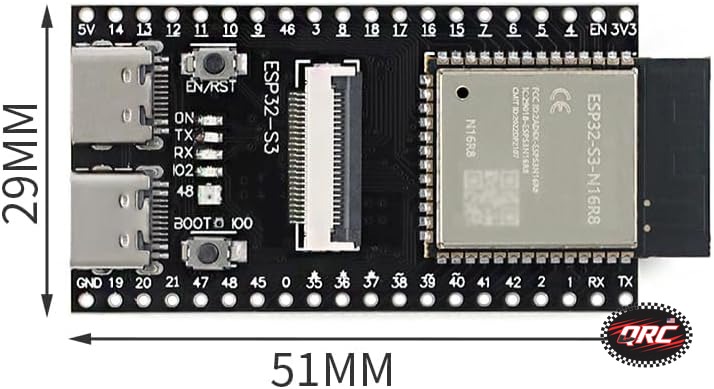
The two store parts come to $45.98. The ESP32-S3-N16R8 CAM Development Board with OV5640 Camera, Dual USB-C, WiFi + Bluetooth 5 ($22.99) is the board: ESP32-S3 dual-core, 16MB flash, 8MB PSRAM, dual USB-C, WiFi plus Bluetooth 5. The OV2640 NoIR Night Vision Camera Module, 850nm, 160-Degree Wide Angle, 24-Pin DVP for ESP32-CAM ($22.99) is the night-vision camera that swaps into the board socket. Prices are the live store prices verified November 19, 2026. In-stock parts ship from New York in 1-2 business days.
Why the N16R8 board: the 16MB flash and 8MB PSRAM leave room for camera buffers and recording, and the dual USB-C ports split OTG and serial duties, so the board plugs in and starts developing with no adapters needed. The board ships with the OV5640 camera fitted, and you swap in the NoIR OV2640 for night vision.
Step 1: Swap the camera module
Power the board off. Open the camera socket latch and lift the OV5640 module out. Seat the NoIR OV2640 module in the socket, FPC fully in and straight, then close the latch. The NoIR module uses the same 24-pin DVP connector, so this is a straight swap. Do not power the board until the module is seated.
Step 2: Set up the code
In Arduino, use the CAMERA_MODEL_ESP32S3_EYE model. That sets the camera pins for this board: XCLK GPIO15, SIOD GPIO4, SIOC GPIO5, VSYNC GPIO6, HREF GPIO7, PCLK GPIO13, and data lines D0 to D7 on GPIO11, GPIO9, GPIO8, GPIO10, GPIO12, GPIO18, GPIO17, and GPIO16. PWDN and RESET stay at -1, because this board does not wire them to a GPIO.
The SD card runs in SDMMC 1-bit mode on GPIO39 for clock, GPIO38 for command, and GPIO40 for data. Set the sketch to save stills or clips to the card so you keep footage even when WiFi drops. See the ESP32-S3-CAM pinout guide for the full pin tables.
Step 3: Test on the bench first
Power the board over USB-C and open the camera stream in daylight. Expect a pink or purple tint on the image. That tint confirms the NoIR module is fitted and the filter is gone. Then turn the room lights off, switch on your 850nm IR light, and check the stream again. The image should come back in black and white IR. If the stream stays black in the dark, the IR light is the problem, not the camera: check the light is on, check it is 850nm, and check it points at the nest area and not straight into the lens.
Step 4: Mount the box
Mount the board high in the box, looking down at the nest, with the 160-degree lens covering the whole floor. Mount the IR light to one side so it lights the nest without shining into the lens. Keep the camera and the light out of the birds way, and keep cables out of the nest area. Drill a small hole for the power cable and seal it against rain. The board and the IR light share one 5V supply, so size the supply for both.
If the board also needs WiFi, check the signal at the mounting spot before you fix the box in place. A board that streams fine on the bench can drop off the network once it is inside a wooden box at the end of a garden. Test the stream with the lid on before you walk away.
Step 5: First dark test
Close the box, leave the IR light on, and check the stream after dark. You should see the nest in IR black and white. Let it run overnight and check the SD card in the morning for saved clips. If the card is empty, check the recording code and the card seating before you blame the camera. The SD pins are GPIO39, GPIO38, and GPIO40, and nothing else should share them.
What to watch for
- Daytime tint is normal. The NoIR module has no IR-cut filter, so daylight looks pink or purple. That is the price of night vision.
- IR light placement matters more than IR light power. A light aimed at the lens blinds the camera. A light aimed at the nest lights it.
- Power matters. A weak 5V supply browns the board out when the camera and the IR light draw together. Use a supply rated for both.
- WiFi drops happen. The SD card is your backup, so always record locally as well as streaming.
Parts that fit this guide
Prices below are the live store prices verified November 19, 2026.
ESP32-S3-N16R8 CAM Development Board with OV5640 Camera, Dual USB-C, WiFi + Bluetooth 5 ($22.99)
ESP32-S3-N16R8 CAM board with OV5640 5MP camera, 16MB flash, 8MB PSRAM, and dual USB-C. The board for this BirdBox build.
OV2640 NoIR Night Vision Camera Module, 850nm, 160-Degree Wide Angle, 24-Pin DVP for ESP32-CAM ($22.99)
NoIR OV2640 2MP camera module with 850nm night vision, 160-degree lens, and 24-pin DVP. The night-vision swap for the BirdBox.
ESP32-S3 Development Board with OV2640 Camera, Dual-Core 240MHz, WiFi + Bluetooth 5 LE, 45 GPIOs ($22.99)
ESP32-S3 camera board with OV2640 2MP camera, dual-core 240MHz, 45 GPIOs, WiFi plus Bluetooth 5 LE. The lower-cost board option if you do not need the 5MP camera.
Shop the full range in the ESP32 and ESP8266 category at Quality RC Parts. See also: How to Build a Wildlife Camera with an ESP32-S3-CAM and How to Use the ESP32-S3-CAM Board for Camera Projects.
Frequently asked questions
Can I use the OV5640 that ships on the board instead of the NoIR module?
Not for a dark box. The fitted OV5640 has an IR-cut filter, so it goes blind in the dark just like the standard OV2640. Swap in the NoIR module for night vision.
Do I need the IR light?
Yes. The NoIR module sees infrared light, it does not make its own. Without an 850nm IR light in the box, the stream stays black at night.
Will the birds see the IR light?
850nm IR is invisible to the human eye, and birds do not react to it the way they do to visible light. Keep the light out of the nest area anyway, and keep it from shining into the lens.
Can I stream and record at the same time?
Yes. The N16R8 board has the memory to stream over WiFi and save to SD together. Record locally as a backup, because WiFi drops happen in a garden.
Last updated: November 19, 2026.