
ESP32 Sensor Data Logger: Flash Logging and WiFi Download
This ESP32 sensor data logger logs BME280 readings to onboard flash with LittleFS, then downloads the CSV file over Wi-Fi. No SD card module is needed, because the ESP32 DevKit V1 has megabytes of flash to spare. The logger records a timestamped row every minute, and a web page at the board IP address offers the file for download.
Quick facts
| Item | Value |
|---|---|
| Storage | LittleFS on onboard flash, no SD card module |
| Sensor | BME280, temperature, humidity, pressure |
| Log format | CSV, one row per minute |
| Download | Web page at the board IP address, /download |
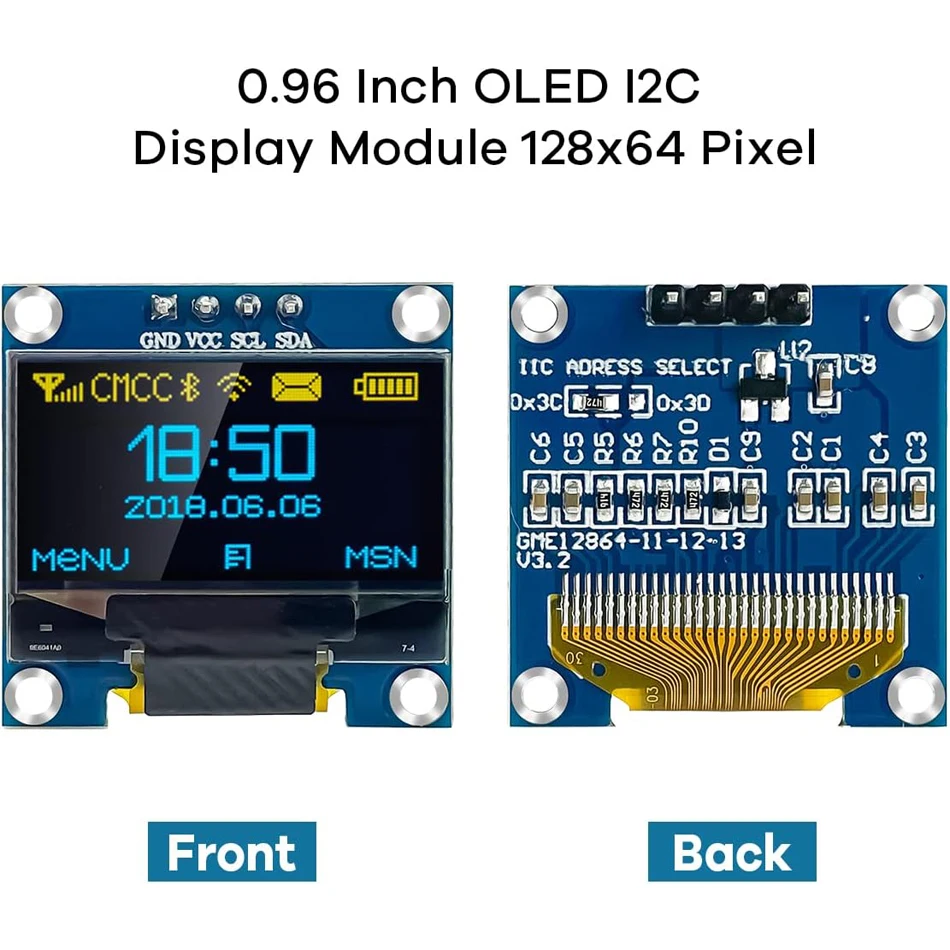
| Display | 0.96 inch SSD1306 OLED shows the latest reading |
| Flash wear | LittleFS spreads writes; log once per minute, not once per second |
ESP32 sensor data logger: why log to onboard flash instead of an SD card?
LittleFS replaced SPIFFS as the filesystem in the Arduino ESP32 core. SPIFFS was deprecated in core 2.x and removed in core 3.x, so new sketches use LittleFS throughout. The ESP32 DevKit V1 ships with 4 MB of flash, and the sketch uses only part of it. LittleFS carves a filesystem out of the spare flash, so the board can store weeks of one-per-minute readings with no extra hardware. A CSV row is about 40 bytes, so one day of minute readings is about 58 KB.
No SD card module is stocked for this build, so the design uses what the board already has. That also removes a failure point: no card socket, no card formatting, and no card to shake loose on a robot. The trade is capacity. Flash holds far less than a card, so this logger suits weeks of data, not years.
LittleFS also handles wear. Flash cells wear out after many writes, and LittleFS spreads writes across the filesystem instead of hammering one spot. Logging once per minute keeps the write count low. Logging once per second would wear the flash far faster for no benefit in a room weather log.
What does each log row hold?
Each row holds the uptime in seconds, the temperature in degrees C, the humidity in percent, and the pressure in hPa. The ESP32 has no real-time clock, so uptime is the timestamp. If you need wall-clock time, note the download time and count back, or add an NTP sync step when Wi-Fi connects.
The file is plain CSV with a header row: uptime_s,temperature_c,humidity_pct,pressure_hpa. Any spreadsheet opens it, and any script can parse it. Keep the format fixed. Changing column order between firmware versions breaks every script that reads the file.
The logger appends one row per minute. It opens the file, writes the row, and closes it. Closing after every write protects the data if power fails. An open file with unwritten data is lost on a reset, but a closed file survives.
How do you download the log over Wi-Fi?
The ESP32 runs a web server with three routes. The root route returns a small status page with the latest reading and a download link. The /data route returns the latest reading as JSON. The /download route streams the CSV file with a download header, so the browser saves it instead of showing it.
Connect the ESP32 to your Wi-Fi network, read its IP address from the serial monitor, and open it in a browser on the same network. The page shows the latest values and a link labeled Download log. Click it and the CSV lands in your downloads folder.
The download reads the file in chunks, so a large log does not need to fit in RAM. The file is closed between writes, so a download started between writes reads a complete file. A download that overlaps a write can catch a partial last row, so download between samples when the data must be exact. In practice the one-per-minute write takes milliseconds, so overlaps are rare.
How do you keep the log from filling the flash?
LittleFS on a 4 MB board gives roughly 1.5 MB of filesystem space, depending on the partition scheme. At 58 KB per day, that is about 26 days of minute readings. The sketch checks the file size on every write. When the file passes 1 MB, it renames the old file to log_old.csv and starts a fresh log.csv.
That rotation keeps one current file and one old file. Download both before they rotate again, or the oldest data is lost. If you need longer retention, lower the sample rate to once per 5 minutes, which stretches the same space to about 4 months.
Check the free space with LittleFS.totalBytes() and LittleFS.usedBytes() at startup and print both to the serial monitor. If used space grows faster than your estimate, a bug is writing too often. Fix the sample interval before the flash fills.
Wiring
Wire the build with the power off. Check every connection in the table before you connect any battery or USB cable.
| From | To | Notes |
|---|---|---|
| BME280 VCC | ESP32 3V3 | 3.3 V; bare chip maximum is 3.6 V |
| BME280 GND | ESP32 GND | Common ground |
| BME280 SDA | ESP32 GPIO 21 | Default I2C data pin |
| BME280 SCL | ESP32 GPIO 22 | Default I2C clock pin |
| BME280 SDO | GND | Sets I2C address 0x76; tie to 3V3 for 0x77 |
| BME280 CSB | 3V3 | Tie high for I2C mode |
| OLED VCC | ESP32 3V3 | 3.3 V logic |
| OLED GND | ESP32 GND | Common ground |
| OLED SDA | ESP32 GPIO 21 | Shared I2C bus with the BME280 |
| OLED SCL | ESP32 GPIO 22 | Shared I2C bus with the BME280 |
Power budget
The ESP32 draws about 80 to 160 mA with Wi-Fi on, and peaks near 240 mA while transmitting. The BME280 draws only a few microamps between readings, and the OLED draws about 20 mA lit. A USB 5 V supply at 500 mA covers the build.
Flash writes add a short current spike, but the spike lasts milliseconds and the supply capacitor on the board absorbs it. The real power cost is Wi-Fi staying on so the download page is always available. If you need battery life, use the deep sleep node build instead, which wakes, logs, sends, and sleeps.
Do not power this logger from a laptop USB port that sleeps. When the laptop sleeps, the USB port may cut power and the log stops. Use a wall USB supply for any unattended logging run.
Build steps
- Install the Adafruit BME280 Library and Adafruit Unified Sensor, plus the Adafruit SSD1306 and GFX libraries.
- Wire the BME280 and the OLED to the ESP32 from the wiring table.
- Edit the Wi-Fi name and password in the sketch, then upload it to the ESP32 DevKit V1.
- Open the serial monitor at 115200 baud and confirm the BME280 is found and LittleFS mounts. Copy the IP address.
- Open the IP address in a browser. The status page should show the latest reading and a download link.
- Leave the logger running for an hour, then download the CSV. Open it in a spreadsheet and confirm one row per minute.
- Check the file size after a day. At 58 KB per day, the 1 MB rotation should not trigger for about 17 days.
Code
Libraries: Adafruit BME280 Library, Adafruit Unified Sensor, Adafruit SSD1306, Adafruit GFX Library. LittleFS and WebServer ship with the ESP32 Arduino core. Board: ESP32 DevKit V1.
// ESP32 sensor data logger: BME280 to LittleFS, CSV download over WiFi
// Board: ESP32 DevKit V1. No SD card module is used.
#include
#include
#include
#include
#include
#include
#include
#include
const char* WIFI_SSID = "YOUR_WIFI_NAME"; // Replace with your network
const char* WIFI_PASS = "YOUR_WIFI_PASSWORD"; // Replace with your password
Adafruit_BME280 bme; // I2C, address 0x76 or 0x77
Adafruit_SSD1306 display(128, 64, &Wire, -1);
WebServer server(80);
const char* LOG_PATH = "/log.csv";
const char* OLD_PATH = "/log_old.csv";
const size_t MAX_LOG_BYTES = 1000000; // Rotate at 1 MB
const unsigned long SAMPLE_MS = 60000; // One row per minute
void logReading() {
float t = bme.readTemperature();
float h = bme.readHumidity();
float p = bme.readPressure() / 100.0F;
File f = LittleFS.open(LOG_PATH, FILE_APPEND);
if (!f) {
Serial.println("Failed to open log file");
return;
}
// Uptime seconds; the ESP32 has no real-time clock.
f.printf("%lu,%.1f,%.1f,%.1f\n", millis() / 1000, t, h, p);
// Read the size while the file is still open; size() after close() returns 0.
size_t logSize = f.size();
f.close();
if (logSize > MAX_LOG_BYTES) {
LittleFS.remove(OLD_PATH);
LittleFS.rename(LOG_PATH, OLD_PATH);
}
}
void handleRoot() {
float t = bme.readTemperature();
float h = bme.readHumidity();
float p = bme.readPressure() / 100.0F;
String html = ""
"ESP32 Data Logger "
"ESP32 Data Logger
"
"Temperature: " + String(t, 1) + " C
"
"Humidity: " + String(h, 1) + " %
"
"Pressure: " + String(p, 1) + " hPa
"
""
"";
server.send(200, "text/html", html);
}
void handleDownload() {
File f = LittleFS.open(LOG_PATH, FILE_READ);
if (!f) {
server.send(404, "text/plain", "No log file yet");
return;
}
server.sendHeader("Content-Disposition", "attachment; filename=log.csv");
server.streamFile(f, "text/csv");
f.close();
}
void setup() {
Serial.begin(115200);
Wire.begin(21, 22);
if (!LittleFS.begin(true)) {
Serial.println("LittleFS mount failed");
while (1) delay(100);
}
Serial.print("LittleFS free bytes: ");
Serial.println(LittleFS.totalBytes() - LittleFS.usedBytes());
if (!bme.begin(0x76) && !bme.begin(0x77)) {
Serial.println("BME280 not found. Check wiring and address.");
while (1) delay(100);
}
if (!LittleFS.exists(LOG_PATH)) {
File f = LittleFS.open(LOG_PATH, FILE_WRITE);
f.println("uptime_s,temperature_c,humidity_pct,pressure_hpa");
f.close();
}
display.begin(SSD1306_SWITCHCAPVCC, 0x3C);
WiFi.begin(WIFI_SSID, WIFI_PASS);
while (WiFi.status() != WL_CONNECTED) delay(500);
Serial.print("Logger at http://");
Serial.println(WiFi.localIP());
server.on("/", handleRoot);
server.on("/download", handleDownload);
server.begin();
}
void loop() {
server.handleClient();
static unsigned long lastSample = 0;
if (millis() - lastSample >= SAMPLE_MS) {
lastSample = millis();
logReading();
display.clearDisplay();
display.setTextSize(1);
display.setTextColor(SSD1306_WHITE);
display.setCursor(0, 0);
display.print("Logged: ");
display.print(millis() / 1000);
display.println(" s");
display.display();
}
}
Test and tune it
Download the CSV after one hour and count the rows. You should see about 60 rows plus the header. Fewer rows means the sample timer is wrong or the board reset. Check the serial monitor for reboot messages.
Open the CSV in a spreadsheet and plot temperature against uptime. The line should be smooth. A jump of several degrees in one minute means the sensor moved, the sun hit it, or the board heat reached it.
If the download returns 404, the log file does not exist yet. Wait one minute for the first sample, then retry. If it still fails, check the LittleFS free space printed at startup.
FAQ
Does this logger need an SD card?
No. It logs to the ESP32 onboard flash with LittleFS. A CSV row is about 40 bytes, so one day of minute readings is about 58 KB, and the filesystem holds about 26 days before rotation.
How long will the log last before it rotates?
About 17 days at one row per minute before the 1 MB rotation renames the file. Lower the sample rate to once per 5 minutes to stretch the same space to about 4 months.
Why is the timestamp in uptime seconds?
The ESP32 has no real-time clock, so uptime is the only clock it has without network time. Note the download time and count back, or add an NTP sync step when Wi-Fi connects.
What happens if power fails during a write?
The sketch closes the file after every row, so at most one row is lost. Rows already written survive a reset because LittleFS commits them on close.
Can I log faster than once per minute?
Yes, but flash wear rises with write count. Once per minute is ample for room weather. Log faster only when the signal changes fast, and rotate the file sooner.
Parts used
Build it with the ESP32 DevKit V1 Development Board, 30-Pin WROOM-32, the BME280 Temperature, Humidity and Barometric Pressure Sensor Module, 5V, I2C and SPI, and the 0.96 Inch OLED Display Module, SSD1306, I2C, 128×64, for Arduino / ESP32 / ESP8266. The live dashboard version is ESP32 WiFi Sensor Telemetry: Live Dashboard with BME280, and the battery version is Battery-Powered ESP32 Sensor Node: Deep Sleep and Power Budget. For the protocol behind the wiring, see I2C vs SPI vs UART: Which Protocol for Your Sensor or Display.
Sources
- Adafruit BME280 breakout guide
- Bosch BME280 datasheet BST-BME280-DS002, revision 1.6, September 2018 (VDD 1.71 to 3.6 V, sleep 0.1 uA, I2C addresses 0x76/0x77)
- Arduino-ESP32 official LittleFS example (begin, FILE_WRITE, FILE_APPEND, rename, remove, exists)
- Espressif Arduino-ESP32 documentation
Last updated: 2026-11-21. Search volume: not verified. Product links use the store short link form with the product ID; confirm the product slug at publish time.